
ArcGIS vs QGIS: Test One Real Project Before You Commit

If cost, cross-platform support, and plugin flexibility drive your decision, QGIS is the stronger fit. If enterprise governance, integrated cloud services, and vendor support matter more, ArcGIS is the better match. Either way, judge them on standards-based services like WMS/WFS and on how each handles one real project. Your next step: run one short workflow test on your own data before you commit.
TL;DR:
- ArcGIS Pro runs natively on Windows, while QGIS supports Windows, macOS, and Linux, so mixed teams can share QGIS projects across those systems.
- QGIS has no license fee, but hosting, training, and internal support still cost money; ArcGIS budgets should include any required paid extensions.
- Before standardizing, test each platform on your largest real dataset, one demanding geoprocessing task, and a print resolution export using the actual workstation.
- QGIS publishing supports WMS, WFS, and WMTS, but hosting services yourself requires infrastructure ownership and resilience planning.
- ArcGIS offers vendor help and paid service level agreements, while QGIS relies on community support; regulated teams should assess whether a support contract is required.
Table of Contents
- ArcGIS vs QGIS at a glance
- What do licensing and total cost of ownership look like?
- Which operating systems and hardware do they need?
- How do their core capabilities compare?
- How well do they automate workflows?
- How steep is the learning curve, and who supports you?
- How do you publish maps and enforce governance?
- Which platform should you choose for your situation?
- Our take on running both platforms side by side
- FAQ
- Sources
ArcGIS vs QGIS at a glance
- Cost: QGIS carries no license fee. ArcGIS is a commercial product with paid licensing.
- Operating systems: QGIS runs on Windows, macOS, and Linux. ArcGIS Pro is native to Windows.
- Enterprise fit: ArcGIS is tightly integrated with Esri’s cloud ecosystem for collaboration and governance. QGIS can publish through standards-based services but leaves hosting choices to you.
- Support model: ArcGIS has a vendor behind it. QGIS is community-developed, so help comes from forums, documentation, and plugin authors.
- Cartography: Both produce publication-ready maps. QGIS adds a layout manager and advanced labeling out of the box.
- Extensibility: QGIS leans on a large plugin ecosystem. ArcGIS broadens its capabilities through licensed extensions.
- Best for learners and solo users: QGIS, because you can install it on any laptop and start today.
- Best for governed enterprise workflows: ArcGIS, especially when approvals, audit trails, and managed hosting are requirements.
- Micro-advice: If you need managed hosting and SLAs, prioritize the commercial platform. If you need to hand the same project to a colleague on a Mac or Linux machine, prioritize QGIS.
- Where to read next: Jump to the sections on cost, performance, and publishing depending on which trade-off worries you most.
What do licensing and total cost of ownership look like?
The licensing gap is the most visible difference. QGIS is free and open source, and it is released under the GNU GPLv2+, so you can install it on as many machines as you like without a seat count. ArcGIS follows a commercial model built around user types and seats, with extensions layered on top for specialized tasks such as advanced spatial analysis or imagery work.
“Free” does not mean zero cost, though, and a licensed seat is not the whole bill. Budget for these recurring or easily missed items:
- Enterprise support: paid SLAs on the commercial side, or consultants and internal expertise on the open-source side.
- Cloud hosting: servers or hosted services if you publish maps for others to consume.
- Paid extensions: add-on modules that unlock tools you assumed were included.
- Training and certification: instructor-led courses, exam fees, and the hours your team spends ramping up.
Procurement is easier when you work in a set order. Request trial seats for the commercial platform. List the extensions your real workflows would need, not the ones in the brochure. Then estimate the annual recurring fees for the full team and compare that figure against the support and training hours you would spend on the open-source route. If you plan to host services in the cloud, our comparison of EKS, AKS, and GKE on cost, scale, and security is a useful background read.
Which operating systems and hardware do they need?
This is where the two diverge sharply for mixed teams. ArcGIS Pro is native to the Windows OS and requires significant hardware resources, while QGIS supports Windows, macOS, and Linux, according to the University of Texas at Austin’s install guide. The QGIS project documents the same breadth: its download pages offer installers for Windows, macOS, and Linux distributions. If half your team works on Macs, that single fact can settle the question.
Hardware expectations deserve their own check. Plan on a capable machine with a modern multi-core CPU and generous RAM, especially for imagery, large vector layers, or 3D scenes. Neither tool rewards underpowered laptops, and ArcGIS Pro in particular is described as demanding. On the QGIS side, the 4.x series brought performance optimizations, including parallel loading for ArcGIS FeatureServer and MapServer providers, which matters when you pull remote layers into a project.
Before you buy or standardize, test on the actual workstation:
- Load your largest real dataset and time the first full draw.
- Run one heavy geoprocessing tool, such as a large overlay or raster reclassification, and watch memory use.
- Pan and zoom with several layers and labels active, then export a map at print resolution.
How do their core capabilities compare?
Both platforms cover the fundamentals of desktop GIS, so the real differences show up in the details of each task.
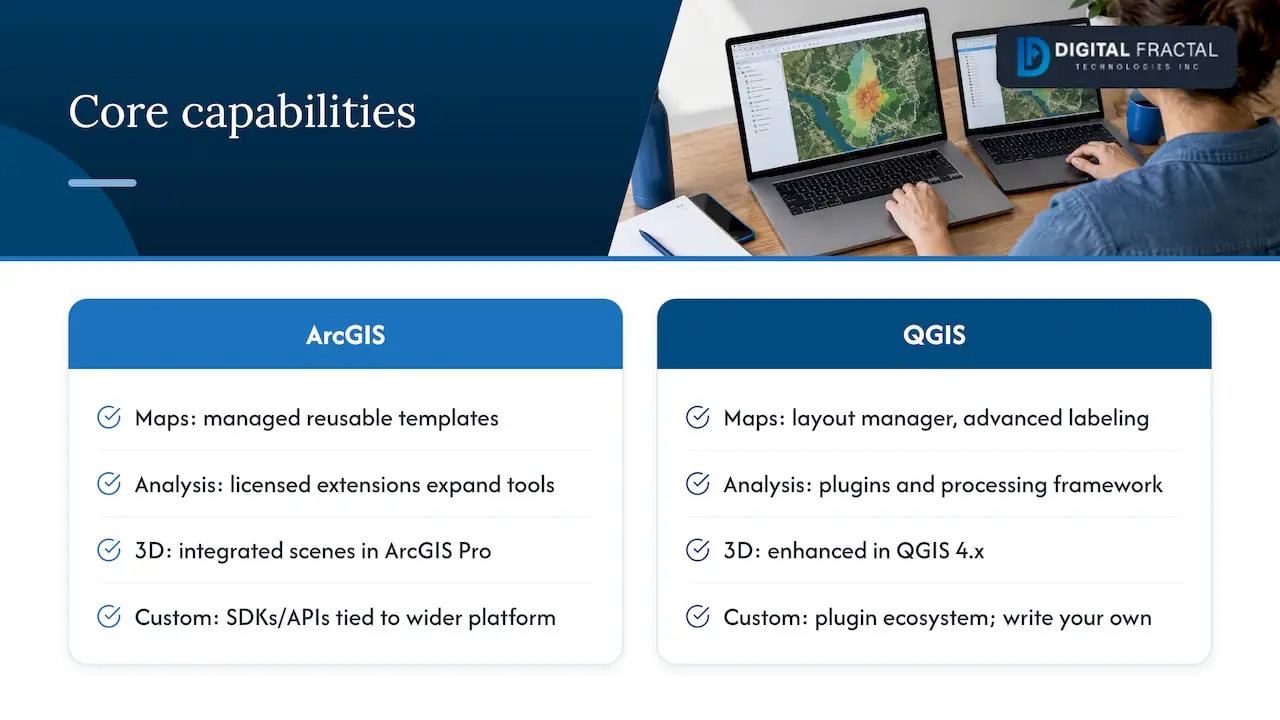
Cartography. QGIS describes itself as focused on cartographic design, with a layout manager and advanced labeling, which makes repeatable, publication-ready maps achievable without extra purchases. ArcGIS also produces polished layouts and tends to appeal to teams that already standardize their map templates inside a managed environment. For a small group producing printed maps, the practical question is whether your templates can be reused across projects, so build one and reuse it in your trial.
Spatial analysis and imagery. Both offer broad vector and raster toolsets. The commercial platform extends its reach through licensed extensions, so a task that looks included in a demo may sit behind an additional purchase. QGIS fills gaps through plugins and its processing framework, which gives you flexibility but means you should confirm each plugin is maintained before you depend on it. If your work is imagery-heavy, test your actual raster formats and your largest scene rather than trusting a feature list.
3D and time-aware mapping. The QGIS 4.x line has enhanced 3D capabilities, and the move to Qt6 in 4.0 brought maintainability and performance and security improvements while preserving the desktop experience. ArcGIS Pro handles 3D scenes within its integrated environment. In both cases, try your own terrain or building data, since sample datasets always look good.
Extensibility and customization. QGIS invites customization through its plugin ecosystem, and developers can write their own. ArcGIS offers SDKs and APIs for custom development and ties them to its wider platform. Pick the route that matches the skills already on your team.
Interface and daily feel. ArcGIS Pro organizes work around projects and a ribbon-style interface, which many Windows users find familiar. QGIS offers a more modular, dockable layout that rewards customization but can feel busy to newcomers. Spend time in each before judging.
How well do they automate workflows?
Automation is where a GIS choice pays off or quietly hurts, and tools like White-Label SEO for Agencies can streamline related automated content workflows effectively. Both platforms support Python scripting and a visual model builder, so you can chain geoprocessing steps into a repeatable pipeline rather than clicking through the same sequence every week. QGIS pairs its Python API with a graphical modeler and batch processing. ArcGIS offers its own Python libraries and a model-building tool tied to its project structure.
Repeatability comes from saving your work as a model or script instead of a manual process. A project file plus a documented model lets a colleague rerun the job and get the same result, and it makes publishing to a server or cloud service less error-prone. If your team is exploring broader automation beyond GIS, our workflow automation service covers that ground.
When you evaluate a platform, automate one small job first. A good three-step test:
- Ingest a dataset and reproject it to your target coordinate system.
- Run a clip or join, then calculate a derived field.
- Export the result and a styled map layout in one batch run.
If the platform handles that cleanly and you can rerun it on new data without rework, you have a reliable foundation to build on.
How steep is the learning curve, and who supports you?
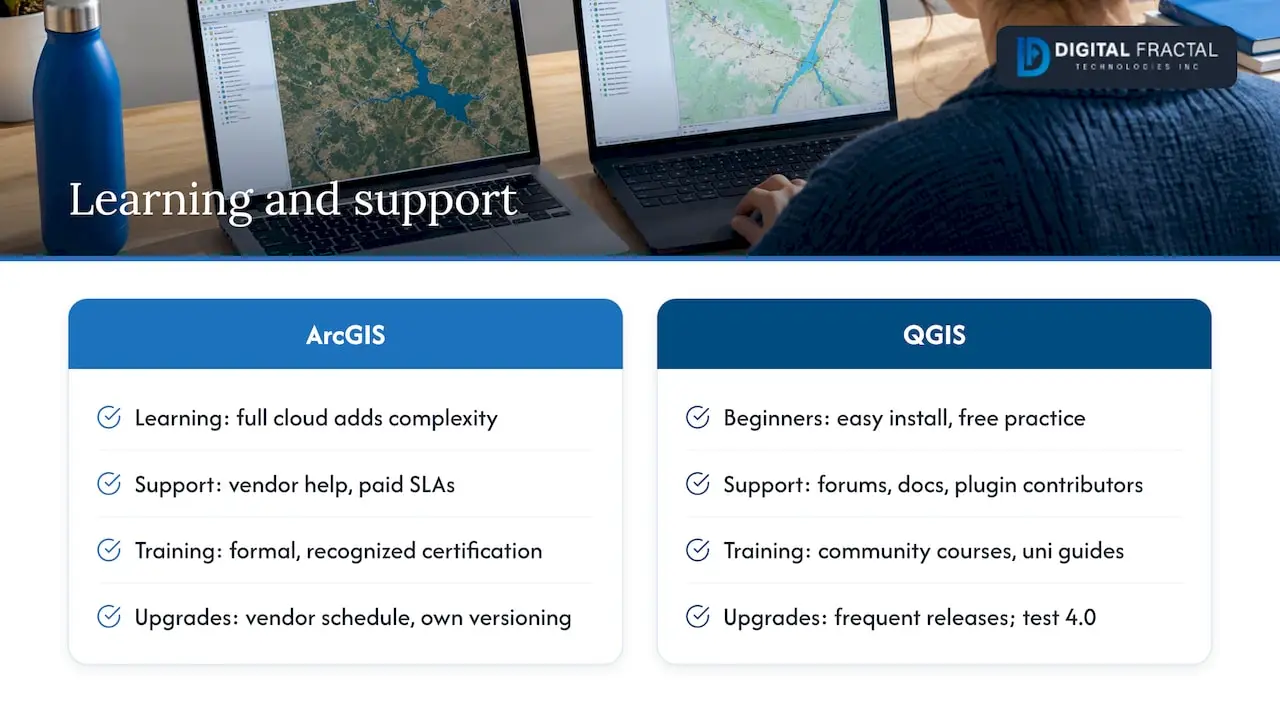
Ramp-up time depends less on the software than on your starting point. Beginners often find QGIS approachable because it installs everywhere, costs nothing to practice on, and has abundant community tutorials. Experienced users coming from another desktop GIS pick up either tool quickly, though ArcGIS has more to learn if you adopt its full cloud ecosystem.
Support differs in kind. The commercial platform offers vendor-managed help and paid SLAs, which matters when downtime has a cost. QGIS is community-developed rather than commercially supported, so help comes from forums, documentation, and plugin contributors. That works well for many teams, but a regulated organization may want a contract to point to.
Training routes also differ. ArcGIS has formal training and certification paths that employers recognize, which can help with hiring and career development. For QGIS, you will mostly lean on documentation, community courses, and university guides such as the spatial software list from the University of Chicago.
Finally, think about upgrade cadence. QGIS ships frequent releases, and a major transition like 4.0 means you should plan test time before moving production work. The commercial platform follows a vendor-controlled schedule with its own versioning policy. Either way, put a recurring maintenance window on the calendar.
How do you publish maps and enforce governance?
Publishing is where enterprise buyers should slow down. ArcGIS integrates with Esri’s cloud services, so sharing a map as a hosted service, controlling who can see it, and tracking changes happen inside one ecosystem. That is a real advantage when a compliance team needs auditability and approved baselines.
QGIS takes a standards-first route. Its documentation includes a server manual for publishing services and integrating with standards-based protocols, which means you can expose layers as WMS, WFS, or WMTS and let any compatible client consume them. That interoperability matters in mixed-tool environments, where one department uses ArcGIS and another uses QGIS and both need to read the same service.
Weigh hosted against self-managed publishing honestly. Hosted options reduce operational work. Self-managed options give you control and avoid lock-in but require someone to run the infrastructure. If you self-host, resilience planning matters too, and our multi-cloud disaster recovery guide walks through it.
When you procure platform-level services, require these governance checks:
- Audit logs showing who changed or published a dataset.
- Approved baselines so only vetted data reaches production maps.
- An approval step before anything goes public.
- Clear data-security and compliance documentation from the vendor or your own team.
Which platform should you choose for your situation?
Match the platform to your scenario, then run one decisive trial for each.
- Learner or tester: Start with QGIS. It is free, works on any operating system, and lets you practice without a budget. Trial: complete one full map from raw data to exported layout.
- Freelancer or consultant: QGIS usually fits, since clients rarely care which tool made the map. Trial: reproduce a past client deliverable end to end.
- Small team producing printed maps: Either works, and QGIS’s layout manager is a strong starting point. Trial: build one reusable template and generate a multi-page atlas.
- Enterprise with governance needs: ArcGIS is the likelier fit for managed hosting, SLAs, and approval workflows. Trial: publish a dataset through your full approval chain.
- Imagery-heavy research: Test both. Trial: process your largest real raster scene and compare time and memory use.
Before you decide, run through this checklist: test a real workflow instead of a sample, confirm that the plugins or extensions you need exist and are maintained, and confirm the hosting model your organization requires.
Our take on running both platforms side by side
Two rules of thumb have held up for me. First, choose based on integration and support requirements before features, because nearly every mainstream feature exists on both sides. Second, trial them in parallel on the same small project, since seeing identical data flow through both tools exposes friction faster than any comparison chart. Plenty of teams end up mixing the two, using QGIS for exploration and ArcGIS for governed publishing, and that is often a sensible outcome rather than a failure to decide.
If your next step involves automating geospatial workflows or reviewing whether your data and processes are ready for AI, we can help with an AI Readiness Audit, a practical way to find automation opportunities before you commit to tooling.
— Souhail
FAQ
Are ArcGIS Earth and ArcGIS Pro the same?
No. ArcGIS Pro is Esri’s full desktop GIS application for editing, analysis, and cartography, and it runs natively on Windows. ArcGIS Earth is a separate, lighter tool for viewing data in 3D.
Which version of QGIS should I use?
For most people, the current stable release is the right choice, and the project’s official site is the place to download it. The 4.x series is built on Qt6, so test your plugins first if you rely on older ones.
What are the disadvantages of QGIS?
QGIS is community-supported rather than commercially backed, so there is no vendor SLA by default. Plugin quality also varies, which means you should check that the ones you depend on are actively maintained.
What can I use instead of ArcGIS?
QGIS is one alternative, since it is free, open source, and runs on Windows, macOS, and Linux. It reads and publishes through standard services, so it works alongside ArcGIS data.
Sources
- Intro to GIS Software – Install GIS Software – LibGuides at University of Texas at Austin
- QGIS Changelog: Entries –