Top Edmonton Mobile App Use Cases by Industry

If I had to sum it up in one line: Edmonton mobile apps work best when they match the job, not when they pile on features.
If you work in Edmonton, the split is simple. Healthcare and government apps focus on privacy and records. Logistics, construction, and oilfield apps focus on field work, weak signal areas, GPS, and dispatch. Across all five sectors, the same few needs show up again and again: offline use, secure login, encryption, photo and document upload, and links to office systems.
Here’s the short version:
- Healthcare: patient access, telehealth, EMS tools, secure records
- Logistics and field service: dispatch, routing, vehicle and bin tracking
- Construction: site logs, safety checks, deficiency tracking, photo proof
- Energy and oilfield: field tickets, emissions records, waste tracking, remote-site use
- Government and civic: resident requests, case routing, alerts, audit logs
A few facts stand out:
- One app update in May 2026 supported dispatch, waste bin work, hydro vac service, and emissions tracking across Alberta and B.C.
- Healthcare app builds can take 6–12 months or more, often because of privacy rules and system links
- In sectors like oilfield, construction, and home care, offline-first use is not optional
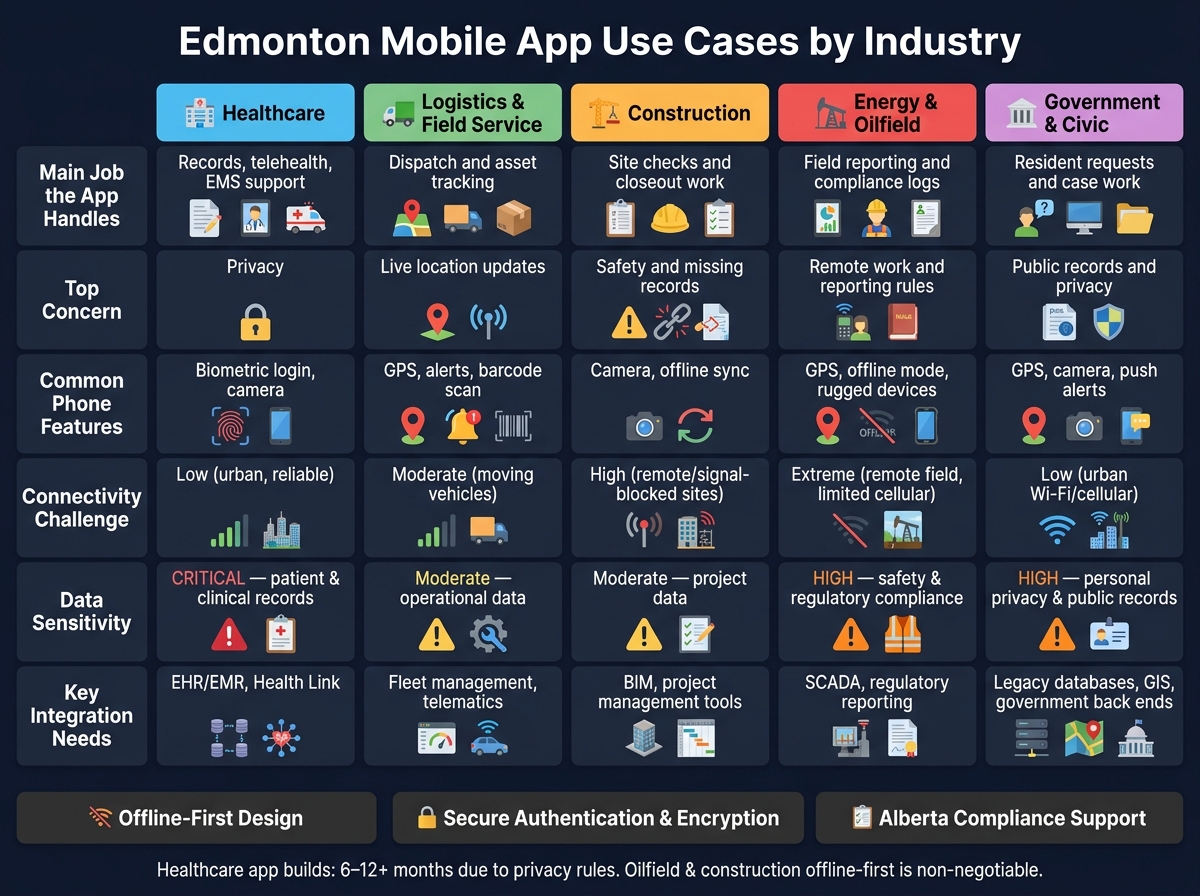
Edmonton Mobile App Use Cases by Industry: Key Features & Requirements
Quick comparison
| Industry | Main job the app handles | Top concern | Common phone features |
|---|---|---|---|
| Healthcare | Records, telehealth, EMS support | Privacy | Biometric login, camera |
| Logistics & field service | Dispatch and asset tracking | Live location updates | GPS, alerts, barcode scan |
| Construction | Site checks and closeout work | Safety and missing records | Camera, offline sync |
| Energy & oilfield | Field reporting and compliance logs | Remote work and reporting rules | GPS, offline mode, rugged devices |
| Government & civic | Resident requests and case work | Public records and privacy | GPS, camera, push alerts |
My takeaway: if your team works across Edmonton, rural Alberta, or job sites with weak service, the app has to do three things well from day one: work offline, protect data, and send field updates back to the office without extra admin.
That’s the lens I’d use to read the rest of this piece.
sbb-itb-fd1fcab
Why Mobile App Use Cases Matter in Edmonton
Edmonton teams don’t work in a small, neat radius. Service areas are big, and many job sites sit far from the office. Add work that stretches across Alberta and into British Columbia, and the gap between field work and office work gets even harder to manage. That’s why a generic app built for a desk-based setup often doesn’t hold up in practice.
What matters most isn’t a long feature list. It’s whether the app fits the job.
For example, hydro vac dispatch teams need real-time GPS and field-to-office data sync. Healthcare teams need secure authentication and strong encryption. Government inspection teams need secure document capture that links back to case management.
Just as important, those field tools can’t work in isolation. Edmonton companies and public-sector teams depend on apps that connect with the systems they already use. If scheduling, records, and reporting don’t sync cleanly, people end up chasing updates by phone, email, or spreadsheets. That slows everything down.
You can see that difference clearly across industries below.
| Industry | Primary Requirement | Key Capabilities |
|---|---|---|
| Logistics & Field Service | Dispatching & resource tracking | Real-time GPS, vehicle assignment, field-to-office data sync |
| Energy & Oilfield Services | Regulatory compliance | Emissions monitoring, hazardous waste tracking |
| Healthcare | Data security & privacy | Encryption, secure authentication, compliance workflows |
| Construction | Site inspection & quality control | Deficiency tracking, walk-through management |
| Government & Civic Services | Case management integration | Secure document capture, back-office sync |
1. Digital Fractal Technologies Inc
Digital Fractal Technologies Inc builds mobile apps for field work in Edmonton, with a focus on public sector, energy, and construction teams. Their work gives a clear picture of how these Edmonton use cases play out day to day.
Core Mobile Workflows
Their apps focus on scheduling, dispatch, emissions monitoring, hazardous waste tracking, and construction deficiency management. A good example is the Manzer Environmental app, updated in May 2026. It supports waste services, hydro-vac operations, and emissions monitoring across Alberta and British Columbia. Another example is the WalkThru Construction Deficiency app, which helps teams track deficiencies during site walk-throughs.
What matters most here isn’t just the app on a phone. It’s the workflow behind it. The software is there to keep field tasks moving, records in order, and follow-up work from slipping through the cracks.
Primary Users
These apps are used by field crews, dispatchers, and office staff. That includes hydro-vac and pressure truck operators, waste management coordinators, and construction inspectors. So the user experience has to work in two very different settings: out in the field and back at the office.
In practice, that means supporting real-time resource tracking, vehicle assignment, and service monitoring across more than one location. Dispatchers get a live view of field resources, while construction teams get a clear way to log deficiencies during inspections.
Alberta Compliance and Integration Needs
For energy and environmental clients, these apps handle emissions and hazardous waste tracking, sync field data to central systems in real time, and support encryption in transit, with no third-party data sharing. In other words, compliance isn’t bolted on later. It’s built into the way the work gets done.
You can see the same workflow model appear across healthcare, logistics, construction, energy, and government, even if the day-to-day tasks look different.
2. Healthcare
Edmonton healthcare apps usually serve four groups: patients, clinicians, EMS crews, and administrators. That split affects almost every product decision, from booking and records to dispatch and documentation.
Core Mobile Workflows
On the patient side, the most in-demand features are real-time emergency department wait times, clinic lookup, personal health record access, and telehealth booking. For clinicians, the focus changes fast: secure messaging between care teams, digital referral management, mobile clinical documentation, and remote patient monitoring for people living with chronic conditions. EMS crews need protocol references, GPS-enabled dispatch, and real-time coordination tools.
Primary Users
These workflows line up with four main user groups. Patients want fast, clear access to information. Clinicians want to spend less time charting and more time caring for people. EMS teams need field tools they can count on. Administrators get the most from automated intake, scheduling, document verification, and compliance audit trails.
Field and Home-Care Needs
For field-based care, such as EMS and home care, offline access is a must. If a crew loses signal, the app still needs to work and then sync data once the connection comes back. GPS helps with dispatch and location-based coordination. Photo capture helps with wound documentation.
Alberta Compliance and Integration Needs
Once the workflow is clear, compliance and system integration become the next big constraint. Healthcare apps in Alberta must use industry-standard encryption and secure authentication, along with strict security testing throughout development.
Integration with provincial health-system integrations matters just as much. Apps that connect with emergency department systems can show real-time metrics and useful insights for care teams. And this is often where timelines stretch. Complex healthcare apps can take 6–12 months or more to build, largely because of integration work and compliance demands.
3. Logistics and Field Service
After healthcare, the focus shifts from privacy-first workflows to speed, dispatch accuracy, and asset tracking. For logistics and field service teams in Edmonton, mobile apps need to support fast-moving work across the city and out into rural Alberta. These teams rely on tools that keep dispatch, crews, and office staff on the same page across many jobs and service areas. That’s why logistics apps make sense when crews, vehicles, and equipment are moving across large territories.
Core Mobile Workflows
The most important workflows are scheduling and dispatch, real-time activity tracking, and field-to-office communication. Dispatchers aren’t just assigning people. They also need to match the right vehicles and equipment to each job, including hydro vac, combo vac, and pressure trucks. For example, Manzer Environmental’s app supports dispatch for solids, liquids, and gases across Alberta and B.C.
Primary Users
The main users are dispatchers, field technicians and drivers, office-based coordinators, and authorised industrial customers. Each group needs a different view of the same work.
- Dispatchers need live visibility into day-to-day activity
- Drivers need job details and routing
- Coordinators need status updates
- Customers need access to service progress
Access stays limited to staff and authorised customers.
Asset and Resource Tracking
For Alberta operations, asset and resource tracking is a must. Mobile apps need to track bins, vehicles, and specialised industrial equipment while keeping service activity visible across many locations. In plain terms, the app needs to show what asset is where, who’s using it, and which job it’s tied to. That helps keep vehicles, bins, and specialised equipment assigned to the right work without mix-ups.
Alberta Compliance and Integration Needs
Apps used for field service in Alberta should include workflows for emissions monitoring and hazardous waste tracking. They also need secure authentication and encryption to protect dispatch, customer, and service records when the app syncs with back-office systems.
The details change by service type, but the day-to-day pattern stays much the same.
| Service Area | Key Alberta Field Workflows |
|---|---|
| Solids | Waste bin scheduling, hazardous and non-hazardous waste collection |
| Liquids | Hydrovac, combo vac, pressure truck dispatch, tank and vessel cleaning |
| Gases | Emissions monitoring, regulatory compliance tracking |
| Logistics | Job dispatching, vehicle and resource assignment, real-time activity tracking |
4. Construction and Infrastructure
Construction follows the same field-first setup as logistics, but the focus changes. Here, the big concerns are safety, compliance, and closeout. Sites in Edmonton can change by the hour, and when paperwork falls behind, safety issues and compliance gaps can pile up fast. That’s why mobile apps are used to record inspections, daily logs, defects, and equipment usage as the work happens.
Core Mobile Workflows
The main workflows centre on safety records, toolbox talk sign-offs, daily site logs, and defect tracking. Punch-list and deficiency management helps teams connect site issues to completion tasks, so problems don’t get lost near the end of a job. Equipment usage records and resource assignment also give supervisors a clear view of crews, equipment, and site assignments across active projects.
Primary Users
Each role on a construction project looks at the same site data from a different angle.
| User Role | Primary Mobile Need | Key Feature |
|---|---|---|
| Site Supervisor | Resource management | Equipment and operator scheduling; digital daily logs |
| Safety Officer | Safety compliance | Toolbox talk sign-offs; incident reporting with photos |
| Project Manager | Oversight and risk | Subcontractor Workers’ Compensation Board (WCB) and insurance checks; audit trails |
| Field Crew | Task execution | Fast field ticket processing; real-time dispatch updates |
Offline/GPS/Photo Needs
Many job sites operate in places with weak or no signal. So the app needs to save data offline and sync it once service comes back. GPS and photo capture matter most for incident reports and site inspections, where proving where something happened can be just as important as showing what happened.
Alberta Compliance and Integration Needs
Construction apps in Edmonton need workflows that match Alberta rules and jobsite demands, including WCB checks, subcontractor insurance checks, and safety records. They also need to connect with custom software development services for project management, payroll, asset tracking, and reporting, so field data flows back to the office without anyone entering it twice.
Energy and oilfield apps build on the same field-first setup, with added focus on emissions tracking and hazardous-material records.
5. Energy and Oilfield Services
Energy and oilfield apps have to do more than log work. They need to record what happened in the field, show where it happened, and keep compliance records intact. These sites are remote, the working conditions are rough, and the rules matter. If an emissions record is missed or a field ticket comes in late, that can lead to compliance problems or billing disputes that take time to sort out.
Core Mobile Workflows
Compared with construction, the big difference here is simple: every field action also needs to support regulatory records. That changes how the app is built from the ground up.
The main mobile workflows include field ticketing, crew dispatch, asset scheduling, and maintenance checklists. These apps also sort work into solids, liquids, and gases modules for waste, hydro-vac, and emissions tasks.
Primary Users
| User Role | Primary Mobile Need | Key Feature |
|---|---|---|
| Field Operator | Field execution and reporting | Field ticketing; maintenance checklists |
| Dispatcher | Crew and vehicle assignment | Real-time job dispatch; crew scheduling |
| Environmental Compliance Officer | Regulatory reporting | Emissions tracking; hazardous waste records |
| Industrial Customer | Service status | Shared visibility into service requests and operational status |
In plain terms, location proof and clean records matter just as much as fast dispatch.
Offline/GPS/Photo Needs
Remote oilfield sites often have little or no cell coverage. So offline data entry with automatic sync isn’t a nice-to-have. It’s required.
GPS helps confirm where a service took place. Photo capture adds proof for incident reports and equipment condition records. And because crews often work in tough field conditions, the interface needs to be simple to use: large tap targets, high-contrast screens, and very little text input.
Alberta Compliance and Integration Needs
Alberta’s rules require detailed tracking of solids, liquids, and gases on industrial sites. That means the app can’t stop at data collection.
It also needs built-in audit logging, back-office sync, payroll integration, and asset tracking. Those pieces have to connect straight into field ticketing because they’re part of day-to-day operations and required for reporting.
6. Government and Civic Services
Civic apps come with public accountability built in. Residents can report an issue from their phone, attach a photo, and drop a location pin. Staff can then send that request to the right team without phone calls or paper forms. That flow matters because each request needs to move cleanly from submission to assignment to resolution.
Core Mobile Workflows
Residents use these apps to report issues, send service requests, and get alerts such as snow-clearing updates, road-closure notices, and ETA notifications. Staff use them to triage cases, assign work orders, inspect sites, and keep audit trails. AI can route requests based on location and issue type.
Primary Users
| User Role | Primary Mobile Need | Key Feature |
|---|---|---|
| Resident | Submit issues, receive alerts | Geotagged photo submissions; push notifications |
| Administrative Staff | Triage and route cases | Case triage; CRM integration; audit trails |
| Field Crew | Complete assigned work orders | Job acceptance; GPS tracking; digital sign-offs |
Offline/GPS/Photo Needs
Bylaw officers, inspectors, and field crews often work in low-signal areas, so losing service is part of the job. Offline access helps work keep moving when a connection drops. GPS confirms where an issue was logged, and photo capture gives staff the context they need before they arrive on site.
Alberta Compliance and Integration Needs
Civic apps deal with resident data, so they need encryption, secure login, and direct links to case-management, CRM, and ERP systems. AI can automate triage and dispatch, but it has to stay tied to case-management rules. In Alberta, those are the baseline requirements for municipal apps.
Common Mobile App Features Across Edmonton Industries
In healthcare, logistics, construction, energy, and government, mobile apps in Edmonton tend to do the same basic job: keep field work moving, record what happened, and protect sensitive data. That’s why the next section looks at app needs by industry. The building blocks are often the same. What changes is which ones matter most.
Offline-first design lets teams capture information now and sync it later when they’re back in range. That matters in low-signal areas. GPS and mapping help with dispatch, verification, and site location tracking. Camera and document capture help staff collect field evidence, incident records, and compliance files.
Role-based access makes sure only approved users can see sensitive information. Security controls should fit both the sensitivity of the data and the user’s role. Push notifications help dispatch and field teams stay in step. Audit trails log who did what, and when.
Canadian privacy and data-residency expectations matter most in healthcare and government apps. In those cases, sensitive records need clear access controls and local data-handling rules. And none of this works well in a silo. Mobile apps also need to connect cleanly with existing systems.
| Feature | Why It Matters | Industries Most Affected |
|---|---|---|
| Low-signal capture and sync | Field capture without connectivity | Energy, Construction, Logistics |
| Location tracking and verification | Dispatch, verification, and site location | Logistics, Energy, Field Service |
| Field evidence and records | Incident records and compliance files | Construction, Healthcare, Energy |
| Restricted data access | Limits sensitive data to approved users | Healthcare, Government, Energy |
| Live coordination | Keeps dispatch and field teams aligned | Logistics, Construction, Energy |
| Action logs | Records who did what, and when | Healthcare, Energy, Government |
| Local privacy compliance | Access controls and local data handling | Healthcare, Government |
| Back-office connectivity | Connects mobile apps to existing office systems | All industries |
The same core features show up across sectors, but each industry puts more weight on different parts of the stack.
How Mobile App Needs Differ by Edmonton Industry
The same core features can lead to very different product choices depending on the industry. A government app for Edmonton residents puts accessibility and privacy first. An oilfield app used at remote field sites puts offline reliability and safety compliance first. Some needs overlap, but the order of priorities changes fast.
The matrix below shows how those shared features shift by industry. Many of these shifts are now being driven by AI consulting services in Edmonton that help companies automate complex field and civic workflows.
| Industry | Primary Users | Top Workflows | Data Sensitivity | Connectivity Challenges | Required Device Capabilities | Integration Needs |
|---|---|---|---|---|---|---|
| Healthcare | Clinicians, patients, administrators | Monitoring, telehealth, records | Critical – patient and clinical records | Low – mostly reliable urban connectivity | Biometric login, camera | EHR/EMR systems, Health Link |
| Logistics and Field Service | Dispatchers, drivers, technicians | Dispatch, routing, bin scheduling | Moderate – operational data | Moderate – moving vehicles on cellular | GPS, barcode scanning, real-time alerts | Fleet management, telematics |
| Construction and Infrastructure | Site managers, inspectors, contractors | Deficiency tracking, safety audits, reporting | Moderate – project data | High – remote or signal-blocked sites | High-res camera, ruggedised hardware | BIM, project management tools |
| Energy and Oilfield Services | Field engineers, safety officers | Emissions monitoring, hydrovac coordination, asset tracking | High – safety and regulatory compliance | Extreme – remote field locations, limited cellular | GPS, ruggedised hardware, sensors | SCADA, regulatory reporting, field data platforms |
| Government and Civic Services | Citizens, municipal staff | Service requests, permits | High – personal privacy and public records | Low – urban cellular and Wi-Fi | Consumer smartphones and tablets | Legacy databases, GIS, government service back ends |
A few patterns stand out.
- Energy and oilfield services have the toughest offline and compliance demands. These apps need to keep working with little or no signal, then sync later without losing field data.
- Healthcare and government deal with the opposite issue. Connectivity usually isn’t the pain point, but data handling is. Sensitive records shape decisions around authentication, storage, and access controls.
- Construction sits somewhere in the middle for many requirements, but hardware matters more here than people often expect. On busy sites, a rugged device and a high-resolution camera can make day-to-day reporting much easier.
- Logistics leans hard on GPS and live location data. Dispatch teams need a clear view of vehicles and technicians as work moves across Edmonton and the surrounding region.
When you zoom out, the split is pretty simple: citizen-facing apps versus field apps. Government and civic tools need clean, accessible interfaces that work well on standard phones and tablets. Field apps for energy, construction, and logistics are built for trained crews working in rough, demanding conditions.
Conclusion
Across healthcare, logistics, construction, energy, and government, workflow fit matters more than feature count. When an app is built around how people actually do the job, it tends to work better in the field. The pattern is the same across these sectors: the best apps are shaped around the work itself, not a generic checklist of features.
For field teams working across Alberta, a few things are just table stakes. They need:
- Offline use beyond cellular range
- Secure authentication and encryption
- Alberta-specific compliance support for regulatory and environmental reporting
That’s what custom app development in Edmonton looks like in practice. Manzer’s Solids, Liquids, and Gases workflows show how custom mobile apps can line up with very different field operations. And that workflow-first approach is what makes an app worth using once crews are out on site. For Edmonton teams, the choice comes down to one thing: not which features to add, but which workflows the app needs to fix.
FAQs
Which industry needs offline-first mobile apps most?
Industries that operate far from stable networks – especially energy and construction – have the biggest need for offline-first mobile apps.
Why? Because field teams still need to get the job done when the signal drops out.
These apps let crews keep moving in the field and support digital workflows like job dispatching, permit management, and safety inspections without data loss or service interruptions.
How do Edmonton mobile app needs differ by industry?
Edmonton mobile app needs change from one industry to the next. The reason is pretty simple: each sector runs on its own workflows, rules, and day-to-day pressures.
In energy and construction, apps often replace paper-heavy field processes. That can include safety reporting, equipment scheduling, and permit management. The goal is to help crews log work in the field, keep projects moving, and cut down on delays caused by manual admin.
In the public sector, the priority tends to be citizen access. That includes AI-driven chatbots for municipal services, along with tools for document classification and policy compliance. Put plainly, these apps need to help staff handle information properly while making services easier for people to use.
Across all sectors, Canadian privacy and data residency standards still matter. No matter how the app is used, those requirements need to be built into the plan from the start.
What integrations matter most for field and office teams?
The most important integrations link ERP systems, CRM platforms, and field operations tools so office staff and field crews can share data in real time.
In sectors like energy, construction, and healthcare, that often means connecting older systems to mobile or AI-driven platforms through custom APIs, middleware, or integration bots. In Alberta healthcare, integration with Alberta Netcare also matters for provincial compliance and data sovereignty.