
Logistics Automation Opportunities: Where to Start in 2026

The best logistics automation opportunities sit in repetitive, rule-heavy work that your team repeats dozens of times a day: dispatch and scheduling, quotes and order entry, shipment status updates, document handling and inventory replenishment. You don’t need a warehouse full of robots to capture them. You need to find the two or three workflows where hours leak out every week, fix those first, and connect them to the systems you already run. Digital Fractal’s AI Readiness Audit is built to do exactly that ranking, so the first project is chosen on evidence rather than on whatever a vendor demoed last.
TL;DR
- The fastest wins are in dispatch and scheduling, order and quote intake, tracking updates, paperwork and inventory planning, not in heavy hardware.
- Rank each opportunity by three things: hours of manual work per week, error or delay cost, and how clean the data behind it is.
- Dispatch optimization is a good first target because it touches fuel, driver hours and customer promises at the same time.
- Start with one workflow, prove it in a short project, then extend it. We design our projects around results within 90 days.
- An AI readiness audit costs $2,500 to $10,000 one-off and gives you a ranked list before you commit to a build.
Table of Contents
- What counts as a logistics automation opportunity
- Dispatch and route optimization
- Scheduling drivers, docks and warehouse labor
- Quotes, orders and booking intake
- Tracking, status updates and exception handling
- Documents and back-office workflows
- Inventory and demand planning
- Predictive maintenance for fleets and equipment
- How to rank your opportunities
- Examples of logistics automation in action
- A phased plan that fits 90 days
- Start with an AI Readiness Audit
- Our perspective
- FAQ
- Sources
What counts as a logistics automation opportunity
An opportunity is any task that meets four tests. It happens often. It follows rules a person can describe in a few sentences. It pulls information from more than one place, such as an email, a TMS (transportation management system), a telematics feed or a spreadsheet. And a mistake or delay costs real money.
That definition is deliberately narrow. Plenty of things in logistics can be automated, but only some are worth it. A task done twice a month by one person is not an opportunity, however easy it is to script. A task done 150 times a week by three people, each copying data from an email into a system, is.
The areas that most often pass all four tests:
- Dispatch and load assignment
- Driver, dock and warehouse labor scheduling
- Quote requests, order entry and booking confirmations
- Shipment tracking and customer status updates
- Invoices, bills of lading and proof-of-delivery paperwork
- Inventory replenishment and demand planning
- Preventive maintenance for vehicles and equipment
The sections below take the ones that matter most for fleets, 3PLs and distributors, with what each involves and where it goes wrong.
Dispatch and route optimization
Dispatch is where logistics decisions concentrate. A dispatcher balances driver hours, vehicle capacity, delivery windows, traffic, customer priorities and the load that just got added at 2 p.m. Most do this with experience, a map and a spreadsheet. It works until volume grows or the person who holds the knowledge goes on vacation.
Dispatch optimization with AI replaces the guesswork in the repetitive part of that job. A model takes the day’s orders and constraints, proposes assignments and sequences, and re-plans when something changes: a late pickup, a closed road, a cancelled stop. The dispatcher stays in charge and handles exceptions, but stops rebuilding the plan by hand every morning.
What to check before you start:
- Do your orders arrive in a structured form? If half come by phone or by email in free text, intake automation comes first.
- Do you have reliable location and time data? Telematics or driver app timestamps feed the model. Gaps there become bad plans.
- Can you write your rules down? Hours-of-service limits, customer delivery windows, equipment restrictions and union or shift rules all need to be explicit.
Where it goes wrong: teams automate the plan but not the feedback. If actual stop times never flow back into the system, the model keeps planning with the same wrong assumptions. A good project closes that loop from day one.
We cover the routing side in more depth in our route optimization guide for Canadian logistics, and our AI scheduling agent for logistics companies shows how the scheduling side works in practice.

Scheduling drivers, docks and warehouse labor
Scheduling is dispatch’s quieter twin. Who works which shift, which dock door is free at 10:30, how many pickers you need on Thursday given inbound volume: each is a small puzzle that gets solved by phone calls and sticky notes in many operations.
Automating it means forecasting the workload and generating a schedule that respects availability, certifications and overtime rules. The payoff shows up as fewer idle hours, fewer last-minute call-ins and less overtime. For warehouses, see our write-up on AI workforce scheduling for warehouses.
Where it goes wrong: ignoring the human side. A schedule that is optimal on paper but unpredictable for staff creates turnover. Build in fair rotation rules and let people see their schedules early.
Quotes, orders and booking intake
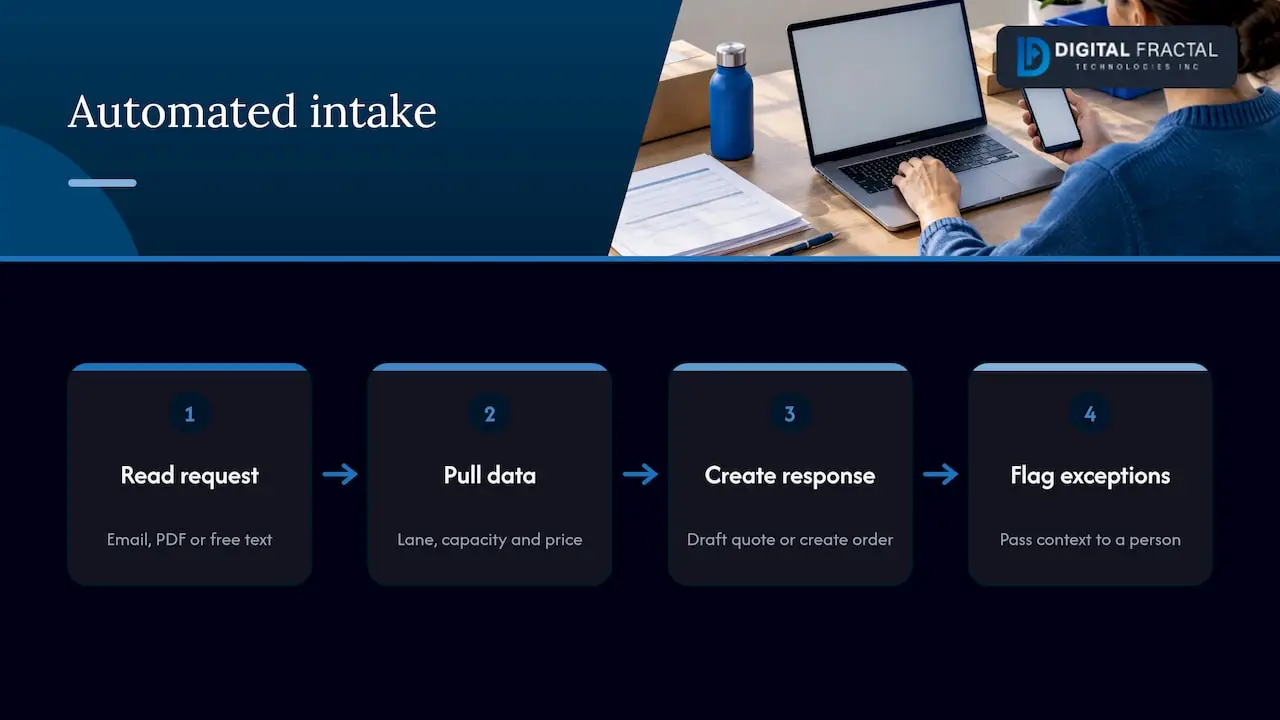
In many freight and distribution businesses, a big share of staff time goes to reading emails and entering data. A customer asks for a rate. Someone looks up the lane, checks capacity, calculates a price, replies. Another customer sends a purchase order as a PDF, and someone retypes it into the order system.
AI agents can now handle much of this: reading the request, pulling the relevant data, drafting the quote or creating the order, and flagging only the unusual cases for a person. Partner research on AI agent use cases by industry shows how widely this pattern of automated intake, routing and hand-off to a human is spreading across sectors, and logistics fits it well because so much of the work is structured requests and standard answers.
The measure here is simple: how many minutes does a quote or order take from arrival to confirmation, and how many of them could be handled with no human touch? Even a 50 percent hands-off rate frees meaningful time for the team to work on accounts and exceptions.
Where it goes wrong: automating with no exception path. Unusual freight, a customer with special terms, a missing field: the system needs a clear way to pass these to a person with the context attached.
Tracking, status updates and exception handling
“Where is my shipment?” is one of the most expensive questions in logistics, because it is asked constantly and answered manually. Real-time operational insight, the thing many logistics firms say they lack, usually means two things: knowing where every load is, and being told early when something is about to go wrong.
Automation covers both. Position and status feeds from carriers, drivers and telematics get merged into one view. Rules and models flag a late arrival before the customer calls. Customers receive proactive updates without anyone typing them.
Start by listing your top five exception types: late pickup, missed delivery window, damaged freight, wrong address, customer not available. For each, define who needs to know, how soon, and what the standard response is. Each of those definitions becomes an automation rule.
Documents and back-office workflows
Bills of lading, proof-of-delivery photos, customs paperwork, carrier invoices and freight bills: the back office runs on documents. Reading them, matching them to the load, and checking the amount against the agreed rate is repetitive work that suits automation well.
A typical document workflow looks like this:
- A document arrives by email, portal or driver app.
- The system reads and classifies it, and extracts the fields that matter.
- It matches the document to the shipment or invoice record.
- Anything that matches within tolerance is approved or filed. Anything that doesn’t goes to a person.
Our workflow automation in logistics guide walks through what to fix first, and our AI workflow automation services page describes how we connect these steps to the systems you already use.
Inventory and demand planning
For distributors and warehouse operators, inventory is the largest pool of tied-up cash. Too little stock means missed orders. Too much means storage cost and write-offs. Forecasting demand by SKU and location and setting reorder points is arithmetic-heavy work that people typically do in spreadsheets.
McKinsey’s analysis of early adopters of AI in supply chain management reported improvements in logistics costs, inventory levels and service levels compared with peers that had not adopted it. Results like those depend on data quality and on how a company applies the tools, so treat them as a direction rather than a promise for your operation.
The practical starting point is the same as elsewhere: pick the product groups where stockouts or overstock hurt most, and test a forecasting model there. Our AI inventory optimization guide for supply chain managers shows the steps.
Predictive maintenance for fleets and equipment
A truck that breaks down on a route costs more than the repair: a missed delivery, a tow, a rebooked load. Predictive maintenance uses engine, vibration or usage data to flag parts likely to fail so you service them on your schedule. It is a natural fit for fleets that already collect telematics data and have not yet used it for anything beyond location.
Computer vision is a related option for yards and docks, for example reading trailer numbers or checking load condition at the gate. Our computer vision work covers this kind of use.
How to rank your opportunities
With a list of candidates, you need a way to choose. A simple scoring table does it. Give each opportunity a score from 1 to 5 on each criterion, then sort.
| Criterion | What to ask | Score high when |
|---|---|---|
| Volume | How many times a week is this done? | Hundreds of times, by several people |
| Cost of error | What does a mistake or delay cost? | Fuel, penalties, lost customers |
| Data readiness | Is the input digital and consistent? | Structured data in one or two systems |
| Rules clarity | Can you describe the decision in plain words? | Clear rules with few exceptions |
| Integration effort | How many systems must connect? | One or two, with available APIs |
The top scorers are your first projects. Typically they are intake, dispatch, or documents, because those combine high volume with digital inputs.
Two cautions apply to the scoring. First, be honest on data readiness: a workflow with messy inputs needs cleanup before any model can help. Our guide to enterprise data readiness explains what to assess. Second, count hours with real numbers. Ask the people doing the work to log a week of time. The result usually surprises management.
Examples of logistics automation in action
Three patterns come up again and again.
A regional carrier with a dispatch bottleneck. Two dispatchers spend the first three hours of each day building routes. An optimization model proposes the plan in minutes, and the dispatchers review it, adjust for known customer quirks and handle the changes that come in during the day. Their time moves from assembly to oversight.
A 3PL drowning in email. Customers send rate requests and orders in free text and PDFs. An AI agent reads them, creates the records and replies with standard confirmations. Staff handle only the flagged exceptions.
A distributor with stockouts and excess. A forecasting model sets reorder points by SKU and location. Planners review the recommendations for the top products instead of rebuilding a spreadsheet each week.
These are illustrative patterns, not client results. For real project write-ups, see our case study archive, and for a longer list, seven automation use cases for logistics teams.
A phased plan that fits 90 days
A first project should be small enough to finish and large enough to matter.
- Weeks 1 to 2: audit. Map the workflows, measure hours and errors, check data and systems, and rank the opportunities.
- Weeks 3 to 8: build the first workflow. Connect the data sources, build the automation, and run it beside the manual process.
- Weeks 9 to 12: go live and measure. Switch over, track time saved and error rates, and decide what comes next.
We shape our engagements around a 90-day path to tangible results, and every solution is customized to your workflows, systems and goals. If you want to estimate the size of the prize before you talk to anyone, our workflow automation savings calculator gives a first figure.
Start with an AI Readiness Audit
If you manage a logistics operation and the list above sounds familiar, the AI Readiness Audit is the practical first step. It identifies where automation fits in your operation and ranks the opportunities, so your first build targets real hours and real cost. The audit is a one-off engagement priced from $2,500 to $10,000, and it can lead into implementation of the tailored solution it recommends. You can read the details on the AI Readiness Audit page, or see our AI consulting and machine learning solutions for what comes after.
Teams in Alberta, Quebec and Ontario can also look at our pages for AI consulting in Calgary, Montreal and workflow automation in Toronto.
Our perspective
Most logistics companies we talk to do not lack ideas for automation. They lack a ranking. Every department has a pet project, and without a common yardstick the loudest one wins.
Our view is that the first project should be the one with the clearest hours, the cleanest data and a result you can measure within 90 days. That is why we start with an audit instead of a build, and why we do not sell generic consulting decks. A recommendation is only useful if it is tailored to your workflows, your systems and your goals.
We also think dispatch, scheduling and intake belong together. They share data and they share exceptions. When they are automated as one connected flow, the dispatcher sees fewer surprises and the customer hears about problems earlier.
Pick one workflow, finish it, and let the result pay for the next.
Souhail
FAQ
What are the most common logistics automation opportunities?
The most common are dispatch and route planning, workforce and dock scheduling, order and quote intake, shipment tracking updates, document processing and inventory replenishment. They share high volume, clear rules and digital inputs. Predictive maintenance is a strong addition for fleets that already collect telematics data.
How do I know which opportunity to start with?
Score each candidate on volume, cost of error, data readiness, rule clarity and integration effort, then start with the highest scorer. An AI Readiness Audit does this scoring for you across your whole operation and returns a ranked list.
What does dispatch optimization with AI actually do?
It takes the day’s orders, vehicle capacity, driver hours and delivery windows, proposes assignments and stop sequences, and re-plans when conditions change. Dispatchers review the plan and handle exceptions rather than building it manually each morning.
How much does it cost to find out what to automate?
Our AI Readiness Audit is a one-off engagement priced from $2,500 to $10,000. The range depends on the scope of your operation, and the result is a ranked set of automation opportunities for your business.