
Legacy System Automation: How to Do It Without a Rip-and-Replace

You can automate a legacy system without replacing it. The reliable way is to decide, process by process, whether the system needs a screen-level bot, a proper integration layer, or a staged replacement, and to start with the workflow that costs you the most hours. Teams that skip that decision and simply “add RPA” often end up with brittle bots that break at the next update. At Digital Fractal we start with an AI Readiness Audit, which maps where automation pays off in your own workflows and systems before any build begins.
This guide is for operations and technology leads at logistics firms, construction and field-service companies, and any business running core processes on software that is old but still doing its job. It covers what makes automation hard on legacy systems, the three technical routes, a step-by-step approach, and how to decide between automating and modernizing.
TL;DR
- A legacy system is usually kept because it still works and supports a critical service, so the goal is to automate around it, not to shame it into retirement.
- Three routes exist: UI-level automation (bots that click and type), an integration layer (APIs, middleware, data extraction), and staged replacement. Most real projects mix them.
- UI automation is fast to start but sensitive to interface changes and unusual cases, so it fits simple, rules-based work best.
- Canadian federal guidance favours incremental migration over big-bang replacement, a useful principle for any organization.
- Start with one high-volume workflow, measure the hours it takes, and build from there. Our AI Readiness Audit is designed to pick that workflow.
Table of Contents
- What counts as a legacy system, and why you still run one
- Why legacy systems resist automation
- The three routes to automate a legacy system
- Where UI automation goes wrong
- A practical approach, step by step
- What logistics teams gain from real-time data
- Where AI fits on top of legacy automation
- Automate, modernize or replace: how to decide
- Our view
- How we can help
- FAQ
- Sources
What counts as a legacy system, and why you still run one
A legacy system is software that is outdated but still in use. TechTarget’s guide lists the usual markers: age, vendors that no longer support it, security weaknesses, high upkeep costs and a poor fit with current needs. It also gives the reasons organizations keep them: they work, they meet operational needs, and replacing them can be costly, risky and disruptive, especially when the tools or talent for migration are lacking.
The Open University makes the same point from an academic angle: legacy systems persist because they still meet user needs or support a critical business service, even when they are hard to understand and maintain. Keeping one can be a rational decision.
In practice, this looks familiar:
- A dispatch or fleet system from the 2000s that every driver, planner and invoicing clerk depends on.
- An on-premises ERP where purchase orders, work orders or inventory are keyed in by hand.
- A desktop application with no export function, where staff copy figures into spreadsheets at the end of every shift.
- A mainframe or terminal-style screen that only one or two people really know how to operate.
The cost does not sit in the software licence. It sits in the manual work around it: re-keying data, reconciling two systems, chasing statuses by phone and email. That is what automation removes.
Why legacy systems resist automation
Modern tools assume that other software can talk to them. Legacy systems often do not. The usual obstacles are limited or missing APIs (the interfaces that let one program request data from another), rigid configurations, undocumented business rules baked into the code, and dependencies nobody mapped. Data may live in a proprietary database or in formats that newer tools do not read directly.
This matters most for the readers of this article who want real-time operational insight. A logistics firm that wants live shipment status, dwell times or exception alerts needs data to flow out of the older system continuously, not once a day through a manual export. If the system cannot publish that data, someone or something has to fetch it.
The three routes to automate a legacy system
Route 1: UI-level automation (RPA)
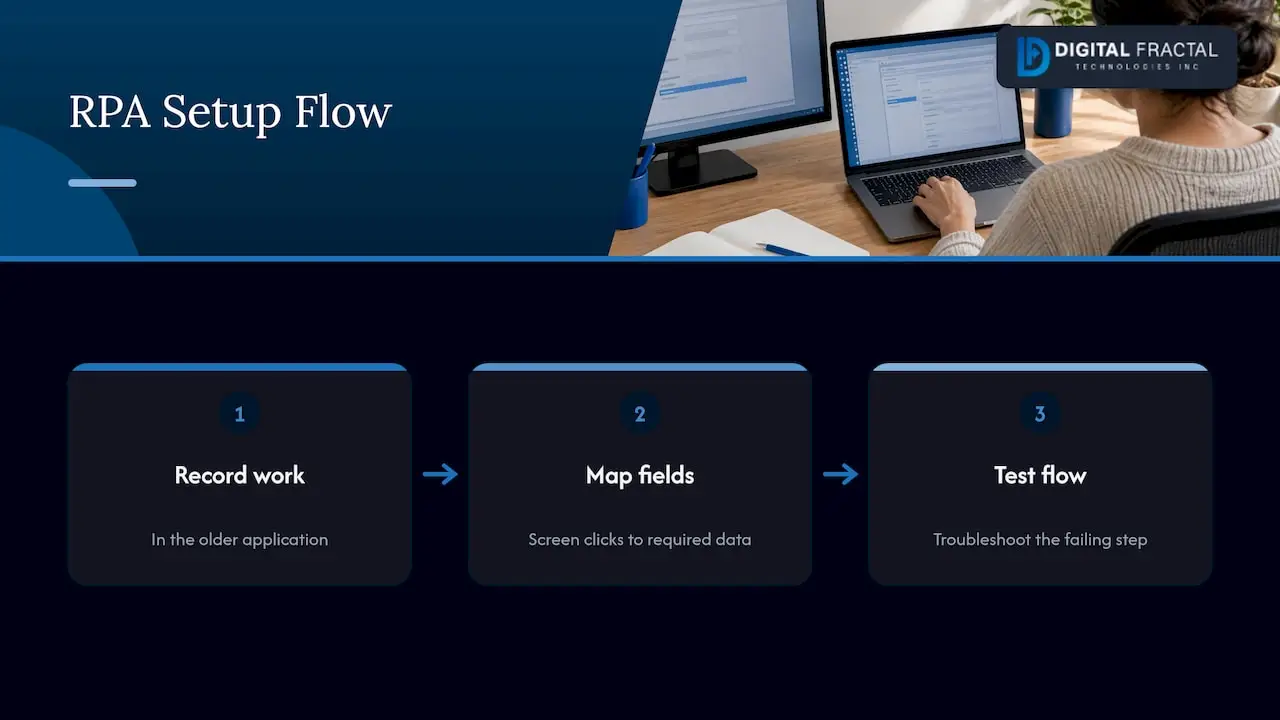
Robotic process automation, or RPA, is software that performs the clicks, keystrokes and field entries a person would perform on screen. It is the standard answer when the application has no API. TechTarget’s report on Microsoft Power Automate describes the typical flow: record a user’s work in the older application, map the screen clicks and fields to the data required, then test the recorded flow and troubleshoot the step where it fails.
This route suits simple, repetitive, rules-based tasks, such as copying a purchase order from email into the ERP, or pulling a status from a terminal screen into a shared sheet. It is the quickest to stand up because the legacy system itself is left untouched.
For a sense of how clean automation looks when the target system does have an API, see this walkthrough on how to automate business accounting with Xero. It makes a useful contrast: where an application exposes proper connections, you do not need to imitate a person at a keyboard.
Route 2: an integration layer
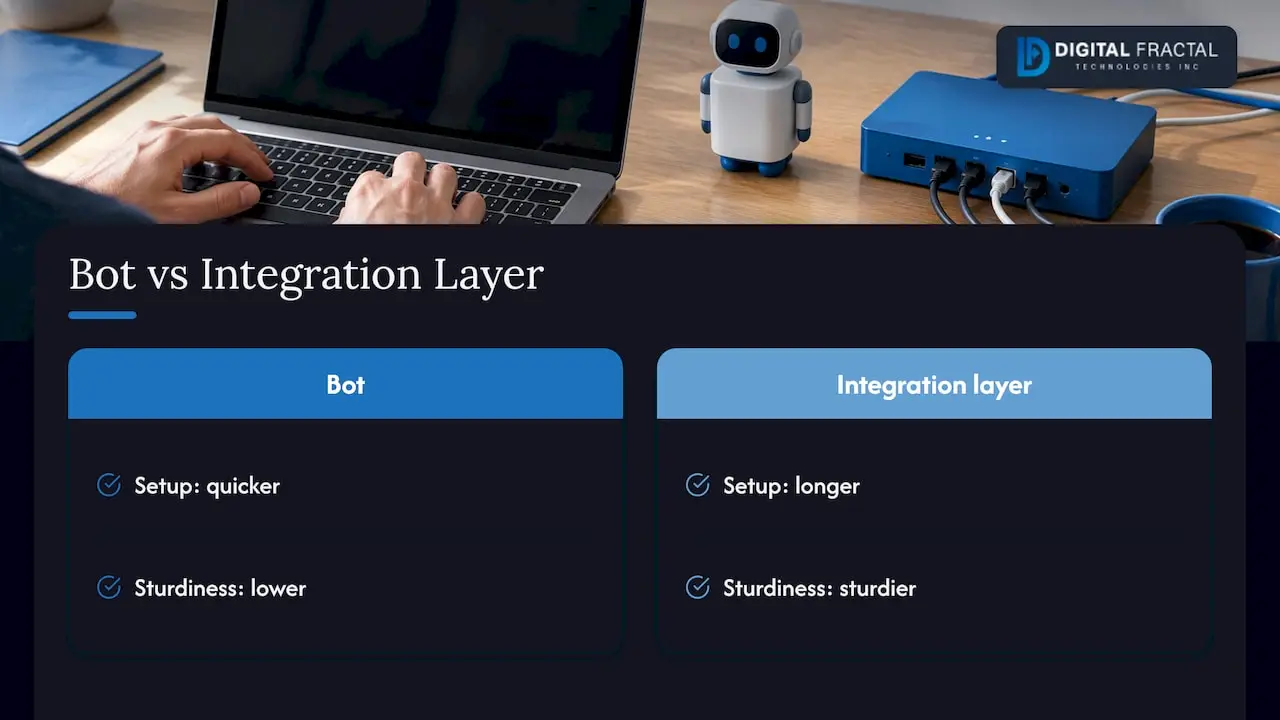
Here you build a connector between the legacy system and everything else: reading from its database, wrapping its functions in a modern API, or routing data through middleware. Once that layer exists, new workflows, dashboards, mobile apps and AI components can use it without touching the old screens.
The Government of Canada’s Service and Digital Target Enterprise Architecture white paper takes this line: it recommends reusable capabilities and published APIs for connecting services, while acknowledging the challenges legacy systems bring. The principle carries over to a private company. Build the connection once, then reuse it.
This route takes longer than a bot, but it is sturdier and it is the one that delivers real-time data. It is also the foundation for custom API integrations and for AI features that need clean, timely inputs.
Route 3: staged replacement
Some systems cannot be saved: the vendor is gone, the hardware is failing, or the security exposure is too high. Even then, the same federal white paper warns that isolated, big-bang replacement projects can raise cost and service-delivery risk, and recommends migrating functional elements incrementally over time. In plain terms, move one function at a time and keep the business running while you do.
Automation and replacement are not opposites. An integration layer built today becomes the seam along which you replace modules tomorrow.
Where UI automation goes wrong
Bots on top of legacy screens are useful, and they have specific failure modes you should plan for from day one. That is design work, not a reason to avoid them.
| Risk | What happens | How to design for it |
|---|---|---|
| Interface changes | A peer-reviewed 2023 study of RPA as an ERP alternative notes that even small presentation changes after an application update can cause UI-driven errors. | Version the bots, test after every patch, and keep a named owner for each one. |
| Fragile execution environment | TechTarget’s report notes UI automation can break when an interface changes and may need the application open in a virtual machine while it runs. | Plan dedicated, monitored machines for bots instead of borrowing a desk. |
| Dynamic decisions | The same study says RPA is best suited to simple, rules-based processes and can struggle with unstructured data, unexpected sequences and complex exceptions. | Keep bots on the predictable path and route exceptions to a person, or to an AI component built for them. |
| Accountability | The study also flags uncertainty about verification and accountability as a deployment concern. | Log every action, define who approves what, and report error rates. |
The pattern is consistent: bots do well on the 80 percent of cases that follow the rules, and the real engineering is in the other 20.
A practical approach, step by step
This is the sequence we would follow with a logistics or construction operator. The first four steps are what an AI Readiness Audit covers.
1. List the manual workflows around the system
Sit with the people who use the system daily and write down every task that involves re-keying, copying between screens, or chasing a status. Note volume per week, minutes per task and error rate. Do not start from the technology. Start from where hours disappear.
2. Score each workflow
For each one, ask four questions:
- Is the process rule-based, or does it depend on judgment?
- Is the input structured (fields, codes) or unstructured (emails, PDFs, photos)?
- Does the legacy system offer any export, database access or API?
- How costly is a mistake, and who checks it?
The answers point to a route. Structured, rule-based work with no API suggests a bot. Work that feeds live dashboards suggests an integration layer. Unstructured inputs suggest adding AI to read and classify them.
3. Check the data
Automation inherits the quality of the data underneath. Duplicate customer records, inconsistent location codes and free-text fields all show up as exceptions later. Our guide to enterprise data readiness explains what to assess before you build.
4. Estimate the return
Multiply hours saved by loaded labour cost, subtract build and run costs, and compare against what a replacement would cost. Our workflow automation savings calculator gives you a first-pass figure to take into that conversation.
5. Build a narrow first automation
Pick the single workflow with the best mix of volume and simplicity. Build it, run it alongside the manual process for a short period, and compare outputs. Our approach is designed around tangible results within 90 days, which is why we keep the first scope small and tied to one measurable outcome.
6. Add monitoring and an owner
Every automation needs an alert when it fails, a log of what it did, and a person responsible. This is the answer to the accountability concern above, and it is the step most often skipped.
7. Expand, then connect
Once the first workflow runs reliably, extend to the next, and begin replacing screen-level bots with proper integrations wherever the same data is used repeatedly. For a broader method, see how to automate workflows in 6 steps.
What logistics teams gain from real-time data
For a logistics firm, the benefit of legacy automation is less about saving keystrokes and more about timing. When status updates, proof-of-delivery records, load assignments and invoices move between systems without waiting for someone to retype them, planners see the current picture instead of yesterday’s. Typical outcomes to target include:
- Faster exception handling. A late pickup flags itself in a shared view rather than surfacing in a customer call.
- Cleaner invoicing. Delivery data flows into billing without manual matching.
- Fewer transcription errors. Each hand-off that a program performs is one fewer chance for a typo.
- Maintenance signals. Data from vehicles and equipment, once it can be read out of older systems, supports predictive maintenance.
These are targets to measure against your own baseline, not promises. Your audit should put numbers on each before you commit to a build.
Where AI fits on top of legacy automation
A bot follows instructions. An AI component can interpret. Once data flows out of the legacy system reliably, AI can read incoming documents, classify requests, draft responses, spot anomalies in shipment patterns and decide which exceptions need a human. That addresses exactly the weakness of pure RPA with dynamic decisions and unstructured data. If you want to see how this works in practice, read how AI powers custom workflow automation and our guide to AI agents for workflow automation.
Developers working on mobile apps face a related version of the same problem: the app needs live data from a back-office system that has no modern interface. The integration layer in Route 2 is what makes that possible, and it is why API work and app development belong in the same plan.
Automate, modernize or replace: how to decide
Use the table as a starting point for the conversation.
| Situation | Usual best route |
|---|---|
| System works, vendor still supports it, pain is manual re-keying | UI automation, then integration over time |
| System works but you need live data in dashboards or apps | Integration layer |
| System is stable but its logic is undocumented and risky to touch | Wrap it, do not rewrite it |
| Vendor is gone, security exposure is high, or hardware is failing | Staged replacement, behind an integration layer |
| Several old systems duplicate each other | Consolidate function by function |
Canadian public-sector plans show the same thinking at scale. The federal Digital Ambition for 2022-23 lists stabilizing systems at risk of failure and avoiding new legacy problems through adaptable, secure design among its goals. Shared Services Canada’s 2026-27 Departmental Plan says it intends to reduce reliance on legacy systems, retire systems, and use automation and business-process modernization to improve efficiency. Stabilize first, automate what hurts, and retire in stages: it is a sound order for a private company too.
Our view
We do not believe in generic off-the-shelf consulting for legacy systems, because no two of them are alike. A dispatch tool that has run a fleet for fifteen years carries rules that nobody wrote down, and those rules are your business.
That is why we begin with an audit of your workflows, systems and goals, and why every solution we build is customized to them. The aim is a visible change within 90 days, not a slide deck.
Our advice is to leave the working core alone, build a reliable connection around it, and let automation and AI take the repetitive work off your team. Replacement then becomes a choice you make on your timeline, not an emergency.
Souhail
How we can help
Our AI Readiness Audit is a one-off engagement priced between $2,500 and $10,000. It identifies where automation pays off across your processes, including in logistics and construction operations. From there, our workflow automation work builds the tailored automations, and our AI implementation and build-out services take on the harder cases involving documents, exceptions and live data.
If you want a Canadian team close to you, see our pages for workflow automation consulting in Canada or Toronto. To understand what an audit costs and delivers before you talk to us, read the AI readiness assessment cost guide.
FAQ
Can you automate a legacy system that has no API?
Yes. Bots can imitate the on-screen actions a person performs, so a system with no API can still be driven. For data you need continuously, an integration layer that reads from the system’s database or wraps its functions is more durable. Most projects use both.
Is RPA a good fit for legacy systems?
It is a good fit for simple, rules-based, high-volume tasks. Research notes it can struggle with unstructured data and complex exceptions, so the design should send those cases to a person or to an AI component. Pair it with monitoring and a named owner.
Should we automate or replace our legacy system?
Automate when the system still does its core job and the pain is manual work or missing data. Replace in stages when the vendor, security or hardware situation makes the system a risk. Canadian federal guidance favours incremental migration over a single large replacement.
How long does it take to see results?
It depends on scope. We design engagements around tangible results within 90 days, starting with one well-chosen workflow. A broader integration layer and later replacements follow once the first automation has proven itself.
What should we prepare before an audit?
List the systems in use, the manual tasks around them, rough weekly volumes, and who owns each process. Our AI readiness checklist covers the rest.
Sources
- 6 reasons legacy systems are still in use, TechTarget
- Approaches to software development: Legacy systems, The Open University
- With robotic process automation, Microsoft Power Automate works with legacy apps, TechTarget
- Robotic Process Automation (RPA) in Lieu of a New ERP System, Industry Science
- Service and Digital Target Enterprise Architecture White Paper, Government of Canada
- Canada’s Digital Ambition 2022-23, Government of Canada
- Shared Services Canada 2026-27 Departmental Plan