
How AI Improves Web App Speed and Efficiency

AI is transforming web applications by automating performance improvements and personalizing user experiences. Faster load times, smarter asset delivery, and optimized code are now possible without constant manual effort. For Canadian businesses, this means serving a diverse, geographically spread audience with speed and precision. Key takeaways:
- Performance Boost: AI reduces load times by 30–50% using predictive caching and real-time monitoring.
- Code Optimization: AI tools identify and fix inefficiencies, saving time and improving app responsiveness.
- Personalization: Dynamic interfaces adapt to user behaviour, increasing engagement and conversions.
- Local Needs: AI handles bilingual content and regional preferences, critical for businesses in areas like Quebec.
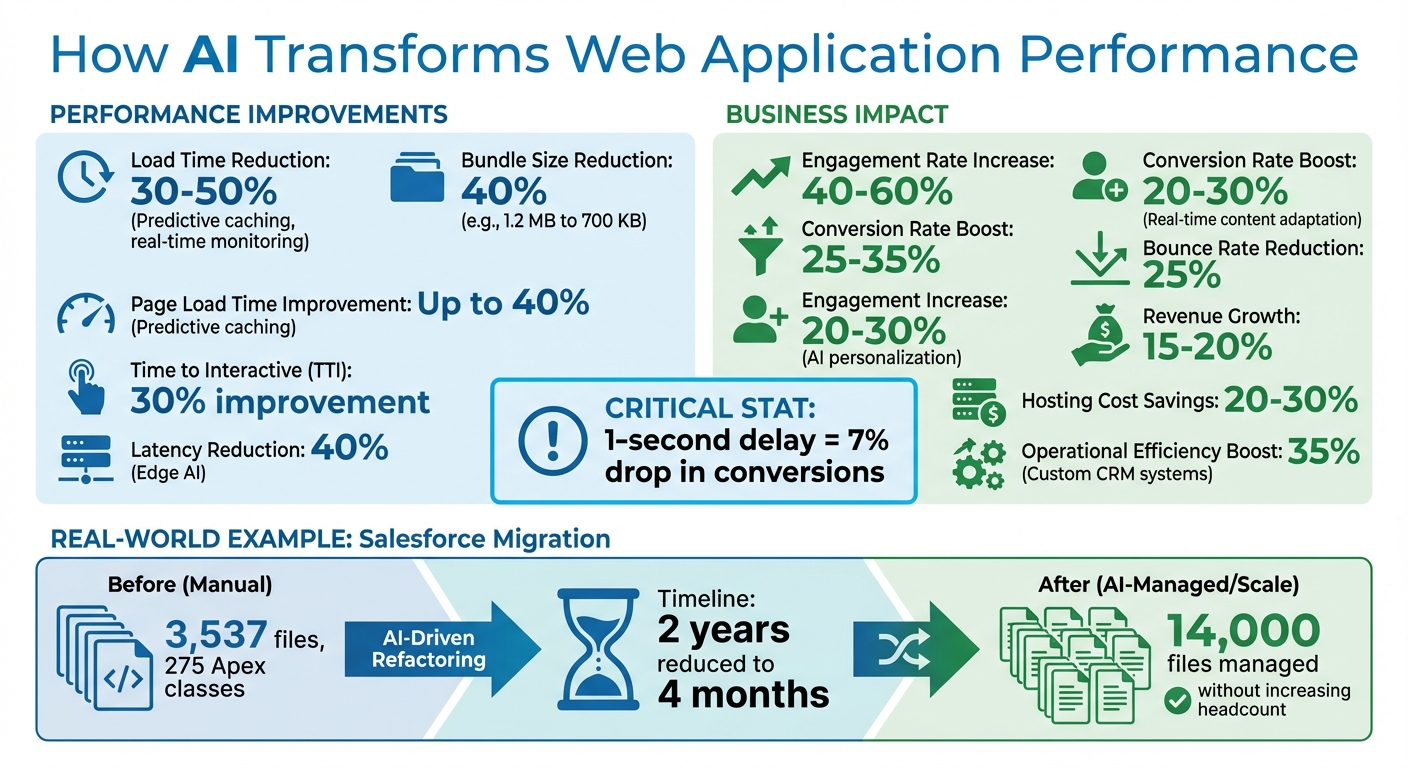
AI Performance Improvements for Web Applications: Key Statistics and Benefits
AI Techniques for Faster Web Applications
AI-Powered Code Optimization
AI can streamline the process of identifying and resolving performance bottlenecks by analysing code for inefficiencies like unused imports, redundant components, and duplicate functions. Instead of relying on manual audits, AI tools can interpret bundle analyser outputs and flag heavy third-party libraries that may slow down your application.
Take, for instance, Smita Bahalkar, a developer who, in January 2026, addressed a React application with a hefty 1.2 MB gzipped bundle size. Using AI-assisted tools to evaluate Webpack Bundle Analyzer data, she pinpointed and replaced resource-heavy libraries such as moment.js with the more lightweight dayjs, and switched from lodash to lodash-es. Additionally, the AI suggested intelligent code splitting for non-critical components. These changes led to a 40% reduction in the bundle size, bringing it down to about 700 KB, and significantly boosted the app’s Lighthouse performance scores.
"AI doesn’t replace performance knowledge – it accelerates analysis." – Smita Bahalkar, Developer
AI’s capabilities are even more apparent in large-scale migrations. In December 2025, Salesforce’s Senior Manager of Software Engineering, Lilach Nachmias, led her team through the modernization of 3,537 files and 275 Apex classes into a multi-tenant Java architecture. By leveraging AI-driven refactoring with a "leaf-to-root" migration strategy based on dependency graphs, the team compressed what was projected to be a two-year manual effort into just four months. The AI automated the redesign of static legacy patterns into scalable service-layer architectures, enabling the team to manage 14,000 files without increasing headcount.
To adopt AI-driven code optimization, start by replacing heavy libraries. Use AI tools to identify dependencies that cannot be tree-shaken and swap them for more efficient alternatives. Prioritise lazy-loading non-critical UI components to improve metrics like "First Contentful Paint". Once your code is optimised, AI can further enhance performance by transforming how assets are cached and delivered.
Predictive Caching and Asset Loading
Traditional caching methods store assets only after a user requests them. AI takes this a step further by predicting and preloading assets before they are needed. Machine learning models analyse user navigation patterns, session durations, clicks, device types, and even geolocation to preload CSS, JavaScript, images, and fonts.
AI systems, ranging from basic Markov chains to advanced RNNs and LSTMs, can accurately anticipate user behaviour. By tracking data such as page visits, scroll depth, and time of day, these models enable predictive caching that can reduce page load times by up to 40% and improve Time to Interactive (TTI) by around 30%.
"Predictive caching powered by AI isn’t just a flashy gimmick. It’s a genuine game changer… It’s like having a psychic cache that’s already three moves ahead." – Shawn A, Site Performance Optimizer
For businesses in Canada, where users span across vast distances, this approach ensures consistently fast experiences. AI can operate server-side to optimise network usage or client-side with tools like TensorFlow.js to adapt to user interactions in real time.
Start with a pilot project – apply predictive caching to a high-traffic section or specific asset type. Use <link rel="preload"> tags tied to AI-generated predictions to silently load assets in the background. Monitor cache hit rates to ensure the AI isn’t preloading unnecessary content that could inflate bandwidth costs. Beyond caching, AI also plays a critical role in proactive performance management.
Real-Time Performance Monitoring with AI
AI-powered tools are transforming performance monitoring from a reactive process into a proactive one. By continuously analysing server logs, user interactions, and third-party scripts, these tools can detect potential issues before they impact users.
For example, AI tools can correlate traffic spikes with resource load times across different regions, identifying bottlenecks like CDN slowdowns in specific time zones before users encounter problems. They go beyond raw metrics, offering automated root cause analysis to explain why performance is lagging. Some platforms even simulate traffic scenarios to predict the impact of new code releases or third-party changes before deployment.
"Traditional performance monitoring is reactive. You spot a lag, then you troubleshoot. AI flips that on its head by being proactive." – Shawn A, Site Performance Optimizer
To get started, integrate AI monitoring after a one-week data collection period to establish baseline performance patterns. Connect the monitoring tools directly to your CI/CD pipeline to catch bottlenecks early in development. Use the AI’s confidence scores to prioritise fixes, and cross-check findings with traditional tools like Lighthouse or WebPageTest to validate the results.
sbb-itb-fd1fcab
Improving User Experience Through AI Personalization
Dynamic UI/UX Adaptation
AI doesn’t just boost technical performance; it transforms user experiences by tailoring interfaces to individual needs.
By analysing real-time data, AI turns static web apps into dynamic, responsive platforms. It can predict user behaviour and adjust elements like headlines, layouts, and CTAs based on factors such as referral sources and device types. For example, tools like Webflow Optimize use AWS Batch to manage up to 10,000 training jobs simultaneously, creating personalized models for each customer. Bayesian neural networks take this further by dynamically allocating web traffic to the most effective UI variations, ensuring a balance between testing new ideas and sticking with proven ones.
"AI-Driven Personalization has evolved from basic recommendation engines to sophisticated systems that modify content, layout, and functionality in real-time based on individual user patterns."
– Tapesh Mehta, Expert in Software Development
Starting with simple models like decision trees is a good first step before moving on to advanced neural networks. When using generative AI for UI updates, it’s essential to include "last mile" validation to ensure the new code integrates smoothly with existing structures. To avoid delays, process personalization tasks asynchronously.
These adaptive interfaces are even more effective when paired with AI’s ability to reduce latency, as outlined below.
Reducing Latency Through Predictive Responsiveness
AI not only adapts interfaces but also speeds up user interactions by eliminating delays.
By predicting user actions, AI preloads content before it’s needed, ensuring a seamless experience. For instance, AI can track user navigation paths and silently load essential assets in the background. This way, when users click, the content appears instantly.
"AI-powered systems preload those resources silently in the background. When the user finally clicks, the content appears instantly."
– Shawn F, Site Performance Optimizer
Edge AI enhances this process by running lightweight models on servers closer to users, cutting data transmission times by about 40%. For Canadian businesses, this is especially valuable given the country’s vast geography, as it ensures consistently fast interactions. Additionally, tools like the Network Information API allow preloading strategies to adapt to a user’s connection speed, avoiding unnecessary bandwidth use on slower networks.
The results are impressive: real-time content adaptation can boost engagement rates by 40–60% and improve conversion rates by 25–35%. However, efficiency is key – think of preloading like packing for a trip: bring only what’s necessary to avoid wasted resources.
Implementation Steps with Digital Fractal Technologies
Assessing Current Web App Performance
Before diving into AI integration, it’s crucial to evaluate how your web app is currently performing. Digital Fractal Technologies offers a 30-day AI Readiness Audit to pinpoint automation opportunities. This process includes stakeholder interviews, system reviews, and data quality assessments. The audit evaluates digital maturity, identifies 3–5 high-return opportunities, and maps out a 6–12 month transformation plan complete with timelines, budgets, and KPIs.
"Our AI Readiness Audit is designed for business leaders who want to uncover the highest‑impact automation and agent opportunities in their organisation." – Digital Fractal Technologies
The cost for this audit ranges from CAD$2,500 to CAD$10,000, depending on the project’s scope. After identifying opportunities, the next step is integrating AI to turn these insights into practical solutions.
Integrating AI Solutions with Digital Fractal Technologies
Once the audit highlights key opportunities, Digital Fractal Technologies steps in to transform operations within 90 days. They integrate AI features such as predictive analytics, computer vision, and automated workflows into existing platforms.
For instance, they worked with Xtreme Oilfield to digitize paper forms, automate certificate management, and streamline job dispatching. This included delivering timesheets and vehicle repair updates directly to field workers’ iPads. Similarly, for an oil and gas service company, they developed a system providing real-time vendor equipment availability, cutting out the need for countless manual phone calls. As Digital Fractal Technologies aptly puts it:
"Your mobile and web applications shouldn’t just display data – they should interpret, predict, and act."
After implementation, the focus shifts to ensuring these systems continue to meet growing demands.
Monitoring and Scaling AI-Optimized Web Apps
Once AI solutions are in place, continuous monitoring becomes essential to maintain peak performance as user demands evolve. Digital Fractal Technologies offers ongoing support, including automated anomaly detection to catch performance issues before they affect users. Their approach ensures scalability from the start, enabling systems to handle increased loads and expand into new Canadian markets seamlessly.
With four years of experience across various industries, Digital Fractal Technologies has fine-tuned its monitoring protocols to keep applications running smoothly. Regular performance reviews and adjustments ensure that the initial improvements in speed and efficiency continue to generate value over time.
Making Faster Web Apps – Easy Perf Wins
Conclusion
AI is reshaping web applications into smarter systems capable of interpreting, predicting, and acting in real time. For instance, AI-driven tools like code optimization and predictive caching can cut load times by 30–50% and reduce latency by 40%. These improvements aren’t just technical wins – they directly impact business performance. Studies show that even a 1-second delay can cause a 7% drop in conversions, making speed a top priority for any web application.
Beyond performance, AI-powered personalization takes user engagement to the next level. By tailoring experiences dynamically, it can increase engagement by 20–30% and lower bounce rates by as much as 25%. These changes don’t just enhance user satisfaction – they also reduce server costs, improve scalability, and help applications handle unpredictable traffic spikes without downtime. Over time, these benefits scale with your application, creating compounding returns.
Choosing to work with Digital Fractal Technologies Inc unlocks access to proven solutions like custom CRM systems, which have been shown to boost operational efficiency by 35%. Their approach focuses on quick implementation – delivering results in just 90 days – while ensuring that your technology evolves to meet future business needs.
"What impressed me the most with Digital Fractal is when issues arose, not only were they diagnosed in a timely fashion, but they also executed on solutions that ensured we would never encounter the same problem twice – future proofing our technology." – Justin N, Manager
Incorporating these AI-driven enhancements allows your web application to exceed expectations. The results? Sustained benefits like 15–20% revenue growth and 20–30% savings on hosting costs.
FAQs
What data do I need to start using AI for web app performance?
To improve the performance of a web app using AI, start by gathering data on user behaviour – such as browsing patterns, interaction times, and navigation paths – along with current performance metrics like load times, server response times, and resource usage. When implementing client-side AI, take into account factors like model sizes, library dependencies, and the capabilities of users’ devices. This approach ensures that AI-powered features enhance the app’s performance without compromising the user experience.
How do I prevent predictive preloading from wasting bandwidth and raising costs?
To keep bandwidth usage in check and avoid unnecessary costs, focus on AI-driven techniques to preload only the most essential web resources. Be mindful when managing speculative preloading to ensure that irrelevant pages or resources aren’t unnecessarily loaded. By doing so, you can enhance performance while reducing wasted resources and easing server load.
How can AI personalization improve UX without slowing the app down?
AI personalization improves user experience (UX) by leveraging client-side AI, which handles data processing directly in the user’s browser. This approach cuts down on latency and reduces the strain on servers, ensuring smoother performance.
On top of that, edge AI processes tasks closer to the user, significantly reducing response delays in dynamic web applications. This ensures faster, more efficient interactions, making applications more responsive and user-friendly.