
Data Integration for AI: A Practical Guide for Canadian Teams

Data integration for AI means getting data from your operational systems into one consistent, trustworthy, timely form that models and AI agents can actually use. Most stalled AI projects fail here, not at the model. This guide explains what the work involves, how pipelines and event-driven design fit in, which Canadian data quality and privacy expectations apply, and how to plan and measure an implementation.
TL;DR
- Data integration for AI is the work of consolidating, cleaning and delivering data from many systems so models get consistent inputs, both for training and for live use.
- A pipeline is more than a transfer job: it creates datasets, trains and validates models, and has to keep running after launch.
- Event-driven architecture suits use cases that need real-time insight, such as fleet, dispatch or equipment monitoring, because systems react to changes as they happen.
- Canadian federal guidance on data quality, privacy and security gives you a ready checklist to build governance in from day one.
- Start with one workflow, one measurable outcome and a short timeline, then widen.
Table of Contents
- What data integration for AI actually means
- How data pipelines prepare and deliver data to AI
- Exploring the data before you integrate it
- Event-driven architecture for AI
- Where integrated data pays off
- Data quality, privacy and security in Canada
- How to plan and measure an AI data integration project
- Our perspective
- Start with an AI readiness audit
- FAQ
- Sources
What data integration for AI actually means
Traditional data integration moves data between systems so people can report on it. Canada’s Department of National Defence puts it plainly: moving and consolidating data within and between data stores, applications and organizations into consistent physical or virtual forms. That definition holds for AI too. What changes is the standard the data has to meet.
A dashboard tolerates a late or slightly messy record. A model does not. It learns from patterns, so inconsistent units, duplicate customers, missing timestamps and silent schema changes turn into wrong predictions. AI also asks for three things reporting rarely does:
- History. Models need enough past records, labelled consistently, to learn from.
- Freshness. A routing or maintenance model that sees yesterday’s data answers yesterday’s question.
- Repeatability. The same transformation must run the same way in training and in production, or the model behaves differently live than it did in testing.
That is the real difference. Traditional integration asks “did the data arrive?” Integration for AI asks “is the data fit to learn from and to act on, every time?”
How data pipelines prepare and deliver data to AI
If you searched for data pipelines for AI, this is the part to read closely. Google for Developers separates machine learning work into data, training and validation pipelines: the data pipeline creates the training and test datasets, the training pipeline trains a model, and the validation pipeline compares the new model with the one in production.
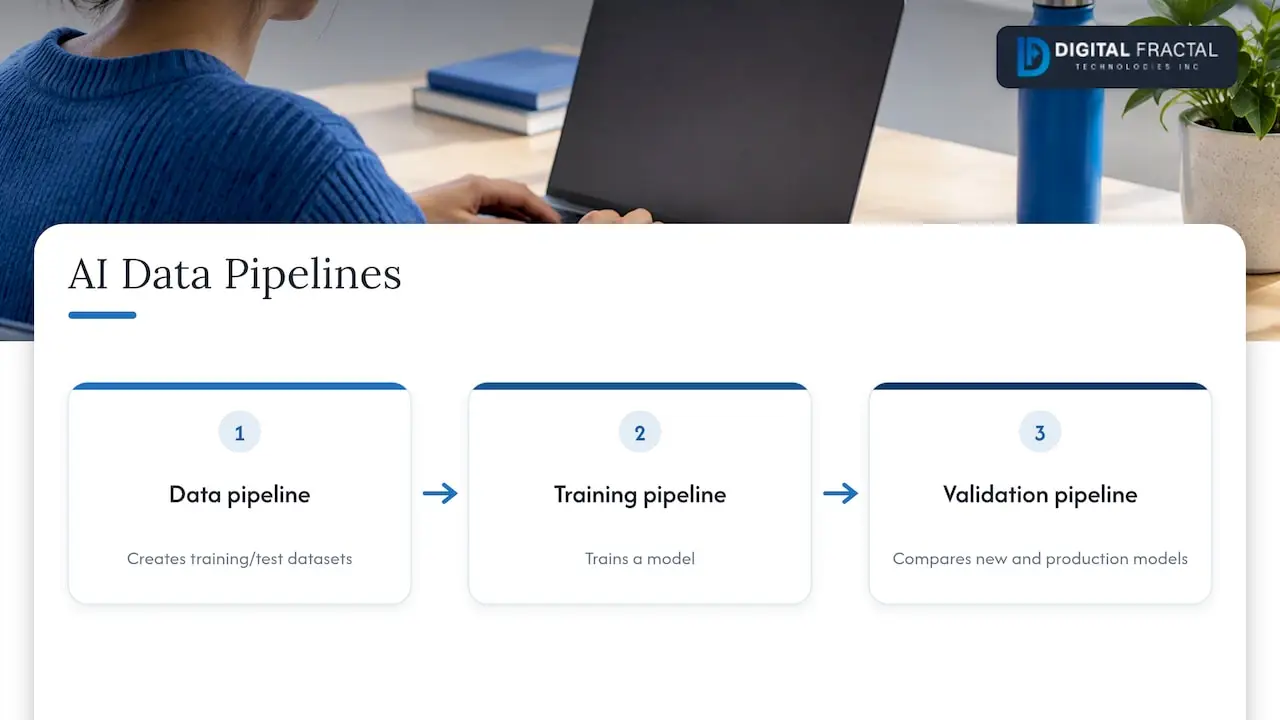
That split is a useful way to scope your own project.
The data pipeline
This is where integration lives. Typical stages:
- Ingest from source systems: ERP, dispatch or telematics, CRM, maintenance logs, spreadsheets, sensors, third-party APIs.
- Standardize formats, units, time zones and identifiers so that one truck, site or customer is one entity everywhere.
- Validate against rules: required fields, plausible ranges, duplicates.
- Transform into features or documents the model can use.
- Deliver to a training set, a feature store, a search index or a live service.
The training and validation pipelines
Once data is dependable, you train and then compare each new model against what is already running before you promote it. Skipping that comparison is how a “better” model quietly makes operations worse. If you want to see how to test each stage, our guide to end-to-end testing of ML pipelines walks through it.
Batch or streaming
Not everything needs to be real time. Monthly demand forecasting runs well on a nightly batch. Flagging a refrigerated trailer that is drifting out of temperature range does not. Choose per use case, because streaming costs more to build and operate.
Exploring the data before you integrate it
Exploratory data analysis (EDA) is the step many teams skip, and the one that saves the most rework. It means examining and visualizing a dataset before modelling to understand its shape. A university course primer describes it as a foundational step before building machine learning models, and it is where you discover problems while they are still cheap.
In an integration project, EDA answers practical questions:
- Which fields are mostly empty, and is that real or a failed mapping?
- Do two systems disagree on the same shipment, asset or invoice?
- Are there outliers that are errors (a truck travelling 4,000 km in an hour) versus genuine events?
- Is the data skewed toward one season, region or customer, so the model would learn a narrow picture?
- Which variables move together, hinting at useful signals?
Run EDA on each source before you build the pipeline, and again on the joined result. The second pass catches the errors that only appear when systems are combined, such as mismatched IDs or duplicated records after a join.
Event-driven architecture for AI
Event-driven architecture (EDA, not to be confused with exploratory analysis) is a design where systems publish events, such as “shipment scanned”, “sensor reading above threshold” or “work order closed”, and other systems subscribe and react. Nothing waits to be polled or batch-loaded.
For AI, this matters in three ways:
- Fresh inputs. A model or agent receives the change as it happens, so a recommendation reflects the current state of the yard, the site or the fleet.
- Loose coupling. You can add a new AI consumer, such as an anomaly detector, without rewriting the systems that produce the events. That is helpful when you are integrating with older platforms.
- A natural audit trail. A stored stream of events shows what the system knew and when, which helps when you need to explain or review an AI-driven decision.
It is not the right default for everything. An event-driven design adds moving parts: a broker, schemas for events, handling for duplicates and out-of-order messages. Use it where timeliness changes the decision, and keep batch for the rest. Many good designs mix both: events for operations, a nightly batch for training sets.
If your core systems are older, the practical question is how to expose their changes as events or API calls. We cover that in AI integration in legacy systems.
Where integrated data pays off
The value shows up when integration is tied to one concrete workflow.
Logistics. Combining telematics, dispatch, warehouse and order data lets a model predict late arrivals, suggest reroutes and flag exceptions before a customer calls. The integration, not the algorithm, is usually the larger share of the effort.
Construction and industrial operations. Maintenance records, equipment sensor data and schedules joined together support predictive maintenance: spotting the pattern that precedes a breakdown, then raising a work order automatically.
Business workflows. Invoices, emails, forms and CRM records that currently pass through people’s hands can be routed, extracted and checked automatically once the underlying data is connected. See our approach to workflow automation.
Mobile apps. An app with AI features, such as a field-service assistant or a driver app that answers questions about a job, is only as good as the data behind its API. Integration comes first, interface second.
Data quality, privacy and security in Canada
Governance is cheapest when built into the pipeline, not added after a review. Canada’s federal guidance gives a usable starting list.
Quality
The Government of Canada’s Guidance on Data Quality recommends assessing data against access, accuracy, coherence, completeness, consistency, interpretability, relevance, reliability and timeliness. It also points to using metadata and duplication checks, minimizing bias, giving people a process to correct personal information, and assessing AI outputs for accuracy, including through bias testing.
Turn that list into automated checks in your pipeline: completeness and duplicate counts per load, freshness alerts when a feed goes quiet, and bias tests on model outputs before release.
Privacy and security
Federal data management policy calls for privacy protection, risk-based security, data stewardship, and protection against unauthorized access, disclosure or destruction, along with compliance with data-retention requirements. It is written for the federal government, but the principles translate well to private organizations that handle customer, employee or driver data.
In practice, that means:
- Decide who owns each dataset and who may see it.
- Minimize personal information in training sets, and mask or remove what the model does not need.
- Encrypt data in transit and at rest, and log access.
- Set retention rules so old data does not sit in a feature store indefinitely.
For a fuller treatment of controls, these data security best practices are a solid reference. For privacy law in a Canadian context, our PIPEDA checklist for AI audits covers the steps, and the AI integration security playbook lays out what security teams should do in the first 30, 90 and 180 days.
If you are moving data to the cloud as part of this work, validate it on the way. We compare approaches in data validation in cloud migration.
How to plan and measure an AI data integration project
Keep the plan small enough to finish and specific enough to judge.
1. Pick one workflow and one outcome
Choose a decision or task that is repeated often, costs real time or money, and has data you can reach. “Reduce manual invoice matching” or “predict late deliveries on two lanes” are good. “Become AI-driven” is not.
2. Inventory the data
List each source, its owner, format, update frequency, quality and sensitivity. This is also where EDA starts. Many teams find their best source is the least documented one.
3. Assess readiness
Check data, systems, skills and governance together. A structured AI readiness audit does this and ends with a prioritized plan. You can also work through our AI readiness checklist on your own first.
4. Build the thinnest working pipeline
Connect only the sources the first use case needs. Add validation checks from the start and test the pipeline end to end before you add complexity.
5. Define measures before launch
Tie metrics to the workflow, not to the technology. Examples:
| Layer | What to measure | Example |
|---|---|---|
| Data | Completeness, duplicate rate, freshness | Share of records with all required fields; minutes since last feed update |
| Pipeline | Success rate, latency, failed loads | Percentage of runs completing on time |
| Model | Accuracy against the production baseline, bias test results | Error rate versus the current model |
| Business | Time saved, errors avoided, cost per transaction | Hours of manual matching per week before and after |
Record a baseline for the business metrics before you change anything. Without it you cannot show the result.
6. Run, review, expand
Review results after a short cycle, fix the data issues that surfaced, then add the next workflow. Our workflow automation savings calculator can help you estimate the return on the first candidate before you commit.
Our perspective
In our work, the model is rarely what decides whether an AI project succeeds. The data plumbing is. A company with a clean, connected view of its dispatch, maintenance or order data can get value from a fairly ordinary model. A company with brilliant models and fragmented data gets demos.
That is why we start with an audit instead of a build. We look at your workflows, your systems and your data, and we shape the integration around the specific process you want to improve. We do not hand over generic consulting decks. Our aim is a tangible change in how a workflow runs within 90 days.
For logistics, construction and oil and gas teams, that usually means choosing the first workflow carefully, connecting only what it needs, using event-driven design where timing matters, and building validation and privacy controls into the pipeline from the beginning. Then the second and third workflows get faster, because the foundation exists.
Souhail
Start with an AI readiness audit
If you are unsure which data to integrate first, or whether your systems can support it, our AI Readiness Audit is the starting point. It is a one-off engagement published at $2,500-$10,000, and it identifies where automation fits and what has to be in place for it to work.
From there we can design and build the pipelines, agents and automations your workflows need. See our AI integration consulting for how that works, or our AI and machine learning solutions for the services we offer. Teams planning to connect AI to an ERP can read our 90-day ERP readiness approach.
FAQ
What is the difference between data integration and a data pipeline?
Data integration is the goal: bringing data from different systems into a consistent, usable form. A data pipeline is the automated mechanism that does it, from ingestion through validation and transformation to delivery. For AI, the pipeline also produces the training and test datasets and has to repeat the same steps in production.
Do I need event-driven architecture to use AI?
No. Many AI use cases, such as forecasting or document classification, run well on scheduled batch loads. Event-driven design earns its cost when the decision depends on what just happened, for example rerouting a delivery or reacting to an equipment alarm. Many organizations use both.
How clean does my data need to be before starting?
It does not need to be perfect, but you need to know where it falls short. Run exploratory analysis on the sources for your first use case, measure completeness, duplicates and consistency, and fix what affects that workflow. Cleaning everything first usually delays the project without improving it.
What Canadian rules should I think about?
If your data includes personal information, privacy obligations apply, and you should review them with your legal or privacy adviser. Federal guidance on data quality and data management is a useful design reference even for private firms. Our PIPEDA and AI checklist is a good place to begin.
How long does an AI data integration project take?
It depends on how many sources you connect and how accessible they are. We scope projects around a single workflow and aim for tangible results within 90 days. The audit stage sets a realistic timeline for your systems.
Sources
- DAOD 6500-0, Data Management and Analytics, Canada.ca
- Guidance on Data Quality, Canada.ca
- ML pipelines, Machine Learning, Google for Developers
- Beginner’s Guide to Exploratory Data Analysis, Georgia Tech
- Complete Guide to Data Security Best Practices