
AWS Lambda Cost Optimization Strategies | Digital Fractal, Edmonton, AB

AWS Lambda pricing is straightforward, but costs can escalate if not managed carefully. Here’s how to control expenses while maintaining performance:
- Key Cost Factors: Requests (CA$0.20 per million after the free tier), execution duration (GB-seconds), memory allocation, and cold starts (billed since August 1, 2025).
- Memory Optimization: Adjust memory to balance execution time and cost. More memory can reduce execution time, sometimes lowering costs.
- Cold Starts: Minimize deployment package size and use Graviton2 processors to reduce initialization time and costs.
- Cost-Saving Tools: Use AWS Lambda Power Tuning, Graviton2 processors (20% lower duration costs), and Compute Savings Plans (up to 17% savings on predictable usage).
- Monitoring: Leverage tools like CloudWatch Lambda Insights, AWS Cost Explorer, and AWS Compute Optimizer to track and optimize spending.
Main Cost Factors in AWS Lambda
AWS Lambda Pricing Model Explained
AWS Lambda’s pricing revolves around three main elements: requests, duration, and optional features. Each invocation is priced at CA$0.20 per million requests after the free tier. The duration cost is calculated in GB-seconds, which combines the allocated memory (in GB) with execution time (in seconds), billed in millisecond increments.
Memory allocation plays a major role in determining costs. You can configure memory from 128 MB to 10,240 MB, and AWS adjusts CPU and network bandwidth proportionally. For example, allocating 1,769 MB provides one full vCPU. Opting for ARM-based Graviton2 processors can reduce duration charges by 20% and improve price performance by up to 34%. AWS highlights this advantage:
AWS Lambda functions running on Graviton2… deliver up to 34% better price performance compared to functions running on x86 processors.
Another cost consideration is Provisioned Concurrency, which keeps functions warm to avoid cold starts. This feature is billed continuously and is not included in the free tier. Additionally, Lambda includes 512 MB of ephemeral storage (the /tmp directory) at no extra charge, with the option to increase storage (up to 10,240 MB) for an additional cost based on GB-seconds.
Understanding these pricing factors provides a clearer picture of how cold starts can influence overall costs and workflow automation efficiency.
How Cold Starts Affect Costs
Starting on 1 August 2025, AWS began billing for the Lambda INIT phase during cold starts. This change has turned cold starts from being a performance concern into a direct cost factor. The added cost is calculated using memory size, INIT duration, and the GB-second rate. While fewer than 1% of invocations typically experience cold starts, the cost per million invocations can rise dramatically – from roughly CA$0.80 to CA$17.80, representing a 22× increase for certain workloads.
Cold start frequency varies depending on workload patterns. High-traffic functions may experience cold starts in less than 0.5% of invocations, while low-traffic functions could see them in over 90% of cases. These events occur when Lambda provisions a new execution environment, often triggered by inactivity (5–45 minutes), rapid scaling, or code updates.
Several factors influence cold start duration, such as runtime and deployment package size. Graviton2-based functions initialize 13–24% faster than x86-based ones. Additionally, reducing deployment packages from 50 MB to 10 MB can cut cold start times by 40–60%. For instance, Python and Node.js functions typically cold start in 200–500 ms, while Java and .NET functions may take 2–5 seconds.
Murugesh R, an AWS DevOps Engineer at AgileSoftLabs, explains the financial impact:
"With INIT billing now active, a Java function with 2-second cold starts and 1 million monthly invocations costs an additional CA$400–600/month just for initialization."
– Murugesh R, AWS DevOps Engineer, AgileSoftLabs
sbb-itb-fd1fcab
AWS Lambda Cost Optimization | Serverless Office Hours
Cost Reduction Strategies
Lowering costs for AWS Lambda functions often involves addressing factors like execution time and cold start delays. Strategies such as memory optimization, automated power adjustments, and reducing deployment package sizes can make a big difference.
Optimizing Memory Allocation
Memory allocation plays a key role in Lambda performance because CPU power and network I/O scale directly with the amount of memory assigned. Increasing memory can reduce CPU-bound execution time, sometimes lowering overall costs despite a higher per-second rate. The goal is to find the "sweet spot" – the memory level where the product of memory (GB) and execution time (seconds) is minimized, all while meeting performance needs.
For example, in a test calculating prime numbers, a function with 128 MB of memory took 11.722 seconds and cost CA$0.024628. Meanwhile, the same function with 1024 MB of memory completed in just 1.465 seconds, costing CA$0.024638. This adjustment delivered a 10x performance boost with almost no cost difference.
However, functions that are I/O-bound (e.g., waiting on external APIs or databases) don’t benefit much from extra memory. For these, allocate just enough to avoid out-of-memory errors. If CloudWatch logs show low memory usage, consider reducing the allocation. Keep in mind that at 1,769 MB of memory, a Lambda function gets the equivalent of one full vCPU.
Using AWS Lambda Power Tuning
For a more automated approach to memory optimization, AWS Lambda Power Tuning can help. This open-source tool, powered by AWS Step Functions, tests a function across memory levels (from 128 MB to 10 GB) and visualizes the trade-offs between execution time and cost. It identifies the optimal configuration for your workload based on one of three goals: Cost (lowest cost per invocation), Speed (shortest execution time), or Balanced (a mix of both using a weighted parameter).
In one 2024 case study, a Java-based function optimized with this tool reduced latency by 76% while increasing duration costs by just 8%. Running a tuning session typically costs less than CA$0.50. For functions that run infrequently, you can include cold starts in the analysis by lowering invocation counts and disabling parallel execution. Plus, the tool’s programmatic output can be integrated into CI/CD workflows to automatically update memory settings whenever new code is deployed.
Reducing Deployment Package Size
Large deployment packages can significantly extend cold start times, as Lambda must download and extract the package before execution begins. Since AWS bills for the total execution time – including initialization – keeping package sizes small can directly reduce costs during cold starts.
Switching from AWS SDK v2 to the modular SDK v3 can help by allowing you to import only the required clients, which greatly reduces package size. Using a bundler like esbuild can shrink a typical Node.js Lambda package from around 85 MB to just 800 KB. As Nawaz Dhandala explains:
"A 5 MB package cold starts noticeably faster than a 50 MB one."
Another way to minimize package size is by moving shared dependencies to Lambda Layers. Layers are cached separately, so they don’t bloat the primary deployment package. You can also exclude unnecessary files by using npm ci --production to avoid including development dependencies and a .lambdaignore file to filter out files like *.md, *.ts, and test directories. For Node.js 18+ runtimes, the AWS SDK v3 comes pre-installed, so you can mark @aws-sdk/* as external in your bundler to avoid including it at all.
Advanced Cost-Saving Methods
AWS Lambda Cost Optimization: ARM vs x86 Architecture Comparison
To go beyond basic memory and deployment size optimization, there are more advanced tactics that can significantly cut AWS Lambda costs. These include leveraging specific architectures and committing to cost-saving plans.
Using ARM Architectures
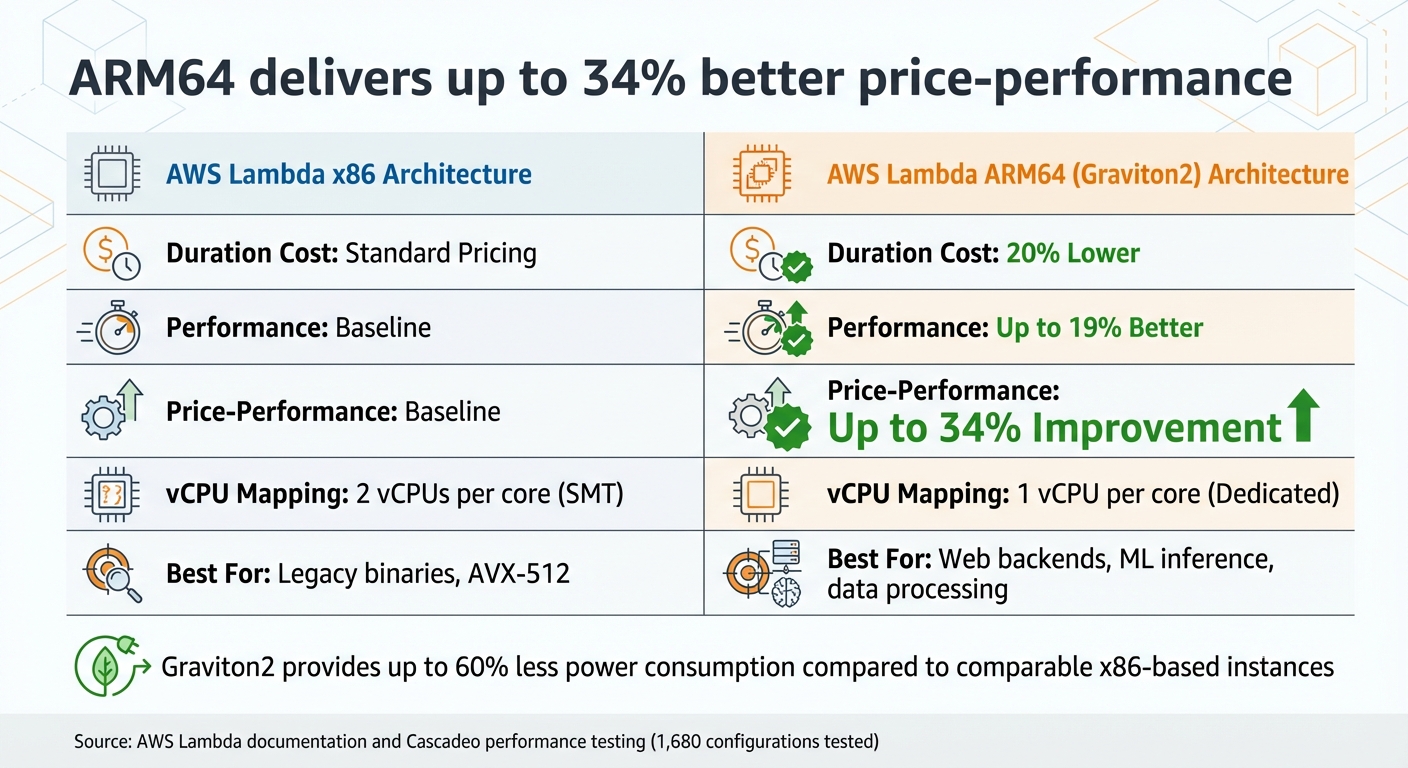
Running AWS Lambda functions on Graviton2 processors, which use the ARM64 architecture, offers a clear cost advantage. These functions charge 20% less for duration compared to their x86 counterparts, and this discount also applies to Provisioned Concurrency. On top of that, Graviton2 processors deliver up to 19% better performance, leading to a combined price-performance boost of up to 34%.
The performance edge comes from ARM’s design. For instance, Graviton2 uses a 1:1 mapping of vCPUs to cores, avoiding the resource contention often seen with x86 processors that rely on hyperthreading. Additionally, Graviton2 features a larger L2 cache per vCPU, which helps reduce latency for tasks like web backends, microservices, and data processing. These processors are also more energy-efficient, consuming up to 60% less power than comparable x86 instances.
Switching to ARM can be straightforward for many interpreted workloads – often requiring just a configuration change. A smart way to test the waters is by routing a small portion of traffic (e.g., 1%) to the ARM version using weighted aliases and monitoring the results through CloudWatch. Tools like AWS Lambda Power Tuning can also help you compare performance and find the best memory settings for ARM versus x86.
In a real-world test led by Cascadeo (an AWS Premier Tier Partner) and AWS architects, 1,680 Lambda configurations were evaluated. CPU-heavy tasks, such as SHA-256 hashing, excelled on ARM, while memory-intensive tasks (like sorting over 1 GB of data in memory) saw a slight dip in performance. Despite this, the 20% lower pricing made ARM the more cost-effective choice overall. As JV Roig, Field CTO at Cascadeo, put it:
"For every Lambda workload you have running on the Arm architecture, you are friendlier not just to your corporate budget but also to the environment, reducing your carbon footprint."
Once you’ve optimized hardware costs with ARM, you can layer on additional savings through pricing commitments.
Applying Compute Savings Plans
For organizations with predictable AWS Lambda usage, Compute Savings Plans provide another way to cut costs. By committing to a fixed compute usage (measured in $/hour) for one or three years, these plans can reduce duration charges by up to 17%. While request charges aren’t discounted, they do count toward your hourly commitment.
What makes Savings Plans flexible is that they allow you to switch between services, regions, or architectures without losing discounts. For high-volume workloads, the discounts are applied first, with any additional usage billed at standard rates. Jeff Barr, Chief Evangelist at AWS, highlighted their value:
"If your use case includes a constant level of function invocation for microservices, you should be able to make great use of Compute Savings Plans."
To find the right commitment level, use AWS Cost Explorer’s Recommendations feature to review your historical Lambda usage. A cautious approach is best – start with a commitment slightly below your minimum hourly spend over the past 30 days to avoid over-committing. Keep an eye on your Savings Plans Utilization and Coverage reports to ensure you’re maximizing benefits. For the best results, implement Savings Plans after optimizing memory and migrating to ARM, so your baseline costs are already minimized.
| Feature | x86 Architecture | ARM64 (Graviton2) |
|---|---|---|
| Duration Cost | Standard Pricing | 20% Lower |
| Performance | Baseline | Up to 19% Better |
| Price-Performance | Baseline | Up to 34% Improvement |
| vCPU Mapping | 2 vCPUs per core (SMT) | 1 vCPU per core (Dedicated) |
| Best For | Legacy binaries, AVX-512 | Web backends, ML inference, data processing |
Monitoring and Ongoing Cost Optimization
Once you’ve implemented ARM and Savings Plans, the work doesn’t stop there. Cost management is an ongoing effort that requires regular monitoring to catch inefficiencies, adjust to changing usage patterns, and avoid surprise expenses. These tools help you stay on top of costs and maintain a smooth cost-management process.
AWS Monitoring Tools
To build on the savings achieved through ARM and Savings Plans, AWS offers several monitoring tools designed to fine-tune cost efficiency. Amazon CloudWatch Lambda Insights is one such tool, providing system-level metrics like CPU time, memory, disk, and network usage – going beyond basic Lambda metrics. It includes a dashboard for identifying over- or under-utilized functions and a detailed troubleshooting view for individual requests. With eight metrics collected per function and about 1 KB of log data sent per invocation, it offers a comprehensive look at performance.
Another tool, AWS Compute Optimizer, uses machine learning to analyse at least 50 function invocations over a two-week period. It classifies functions as either “Optimized” or “Not optimized,” helping you identify whether they’re over- or under-provisioned. Additionally, AWS Lambda Power Tuning can be integrated into your workflows to test memory configurations, particularly during CI/CD processes.
For deeper insights, AWS X-Ray enables active tracing to map application components and pinpoint bottlenecks that extend function durations. Meanwhile, AWS Cost Explorer provides a clear view of spending trends, breaking down costs by factors like requests or duration. To dig even deeper, Amazon Athena can query AWS Cost and Usage Reports, helping you identify which Lambda functions or CloudWatch metric streams are driving up costs.
Building a Continuous Optimization Process
Incorporating cost optimization into your CI/CD pipeline is a smart way to ensure every new code release is fine-tuned for cost efficiency. For example, using AWS Lambda Power Tuning during the CI/CD process allows you to test and select the most cost-effective memory configuration for each update. Establishing a baseline by reviewing average concurrent execution metrics over a 24-hour period can also reveal patterns that help you decide where to apply Provisioned Concurrency or Compute Savings Plans.
Set up CloudWatch alarms to notify you when costs hit 70% of expected levels or when invocation spikes occur unexpectedly. This proactive approach lets you address issues before the billing cycle ends. You can also reduce unnecessary costs by filtering events at their sources, such as SQS or Kinesis, to prevent redundant Lambda invocations. To maintain discipline, enforce governance standards like requiring documented justification for functions using more than 512 MB of memory.
As AWS Solutions Architects Chris Williams and Thomas Moore put it:
Optimization should be a continuous cycle of improvement.
| Tool | Primary Function for Cost Optimisation | Key Benefit |
|---|---|---|
| AWS Cost Explorer | Visualizes cost and usage data over time | Highlights major trends and cost drivers |
| AWS Compute Optimizer | Recommends optimal memory sizes using machine learning | Helps right-size production functions based on data |
| AWS Lambda Power Tuning | Tests functions across memory configurations | Finds the balance between cost and execution time |
| CloudWatch Lambda Insights | Collects detailed metrics (CPU, memory, disk) | Identifies under- or over-utilized functions |
| AWS X-Ray | Provides active tracing to locate bottlenecks | Reduces duration costs by addressing latency issues |
| Amazon Athena | Queries AWS Cost and Usage Reports (CUR) | Pinpoints specific resources or API calls driving costs |
Conclusion
Managing AWS Lambda costs is all about finding the sweet spot between performance and savings for your unique workloads. The strategies outlined here – like fine-tuning memory allocation and transitioning to ARM-based Graviton2 processors – show how thoughtful resource management can lead to reduced expenses while maintaining or even boosting performance. Studies reveal that AI enhanced serverless applications can cut costs by up to 57% compared to traditional setups, which often waste 60–80% of provisioned resources.
This isn’t a one-and-done process, though. As Chris Williams and Thomas Moore from AWS point out, "Optimization should be a continuous cycle of improvement". With every code update, shifting traffic patterns, and new AWS offerings, staying on top of your configurations requires constant vigilance.
Start by adjusting memory allocation using AWS Lambda Power Tuning, filtering events at the source to reduce unnecessary invocations, and setting timeouts based on your p99 duration. For production environments, consider using ARM-based Graviton2 processors to cut costs by 20% right away, and take advantage of Compute Savings Plans for predictable savings.
To stay ahead, integrate cost monitoring into your workflows. Set up CloudWatch alarms to catch anomalies early, review trends in Cost Explorer monthly, and automate memory tuning as part of your CI/CD pipeline. By using tools like AWS Cost Explorer and Compute Optimizer, you can maintain cost-efficient Lambda deployments through consistent, data-driven adjustments. These practical steps ensure your serverless applications remain both high-performing and budget-friendly.
FAQs
How do I find the cheapest memory setting for my Lambda?
To find the most cost-effective memory setting for your AWS Lambda function, experiment with different configurations to strike the right balance between cost and performance. Allocating more memory often speeds up execution since it boosts CPU power, which can sometimes lead to lower overall costs. However, the ideal memory size depends on your function’s unique requirements. Benchmark multiple memory settings to figure out the best performance-to-cost ratio. Keep in mind, the least expensive option isn’t necessarily the one with the smallest memory allocation.
When should I use Provisioned Concurrency vs accept cold starts?
To achieve consistent and low-latency performance for tasks like real-time APIs or latency-sensitive microservices, consider using Provisioned Concurrency. This feature pre-initializes the environment, ensuring requests are handled immediately. Keep in mind, though, that this comes with additional costs.
On the other hand, if your application can handle initial delays or has traffic patterns that are hard to predict, relying on cold starts might be a better option. This approach is more budget-friendly for applications less sensitive to latency, as it avoids the ongoing expenses associated with provisioned concurrency.
How can I tell which Lambda functions are driving my monthly bill?
To figure out which Lambda functions are driving up your monthly AWS bill, take advantage of AWS cost management tools. Start by setting up cost allocation tags, such as function:name, to track expenses for each function individually.
You can also use AWS Cost Explorer alongside CloudWatch metrics – like invocation counts, execution duration, and memory usage – to identify the functions with the highest costs. These insights will help you spot usage patterns and focus on optimizing the most expensive functions to cut down on your overall expenses.