AI-Driven Solutions for Mobile App Speed Issues

Mobile app speed is a make-or-break factor for user retention. Apps that lag or freeze drive users away, leading to lower engagement, higher abandonment rates, and lost revenue. Artificial intelligence (AI) offers powerful tools to tackle these performance challenges by identifying bottlenecks, automating fixes, and optimizing resource use in real time. Here’s how AI improves app speed and responsiveness:
- Real-Time Issue Detection: AI-powered mobile app analytics track performance metrics like load times and rendering speeds, alerting teams to problems instantly.
- Predictive Analytics: Anticipates crashes and slowdowns before they impact users, enabling proactive fixes.
- Automated Code Optimization: AI refactors inefficient code, improving speed by up to 75% and reducing crashes caused by memory leaks.
- Dynamic Resource Management: Allocates CPU, memory, and battery power based on user behaviour, ensuring smooth performance across devices.
- Platform-Specific Tuning: Adjusts settings for iOS and Android devices, maintaining consistent speed regardless of hardware or network conditions.
In Canada, companies like Digital Fractal Technologies Inc. are leveraging these AI tools to help businesses improve app performance, reduce costs, and retain users in a competitive mobile market. Faster apps mean happier users – and AI makes it possible.
How Agentic AI Is Reshaping Mobile App Quality – Kenny Johnston | droidcon Berlin 2025
This session explores how agentic AI is transforming mobile app performance monitoring by moving beyond simple alerts to autonomous problem-solving.
sbb-itb-fd1fcab
Common Speed Problems in Mobile Apps
Mobile App Performance Statistics: Impact of Speed on User Retention and Conversions
Mobile apps often encounter performance issues that can directly impact user satisfaction and business success. Understanding these challenges is crucial to finding targeted solutions.
Slow Load Times and High Latency
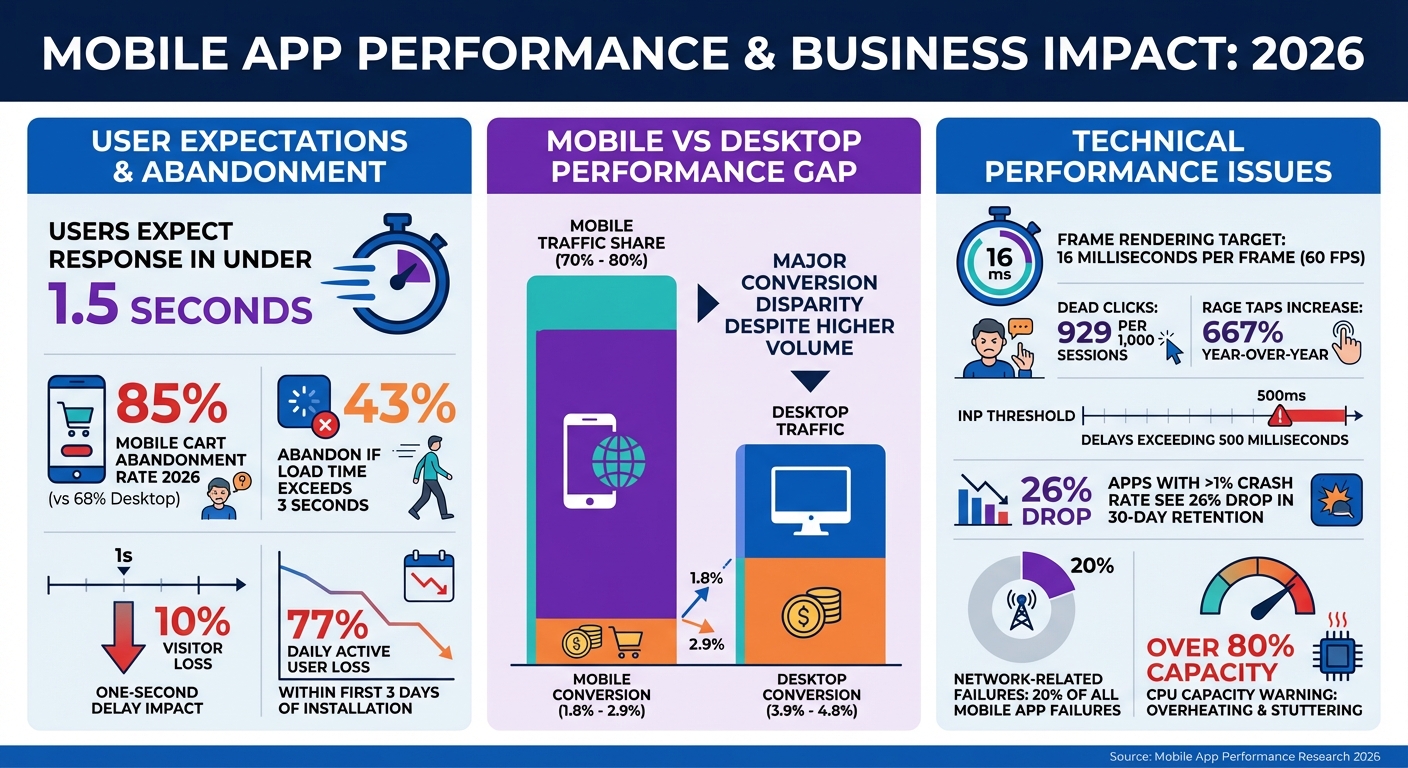
Users expect apps to respond in under 1.5 seconds – any delay beyond that risks frustration and abandonment. Over time, unused scripts from removed features and inefficient server-side code (like nested loops) can build up, slowing down response times. This contributes to higher Interaction to Next Paint (INP) scores, where delays between a tap and visual feedback exceed 500 milliseconds.
The numbers tell the story. Mobile cart abandonment rates hit 85% in 2026, compared to 68% on desktop, largely due to clunky interfaces. Mobile conversion rates are stuck at 1.8% to 2.9%, about half of desktop rates (3.9% to 4.8%), even though mobile devices account for 70% to 80% of traffic. Users also encounter frequent "dead clicks" (929 per 1,000 sessions) and "rage taps" (repeated taps on unresponsive elements), which have jumped 667% year-over-year.
Canadian businesses face unique challenges in remote or distributed environments. For example, Xtreme Oilfield, a major player in energy services, teamed up with Digital Fractal Technologies in 2020 to digitize trucking operations across Canada’s oil and gas sector. Their app replaced manual paperwork with automated dispatching and real-time timesheets on iPads, ensuring smooth operations even in areas with unreliable networks.
But speed issues don’t end with load times – app responsiveness during interactions is equally critical.
Unresponsive User Interfaces
Sometimes, an app may look fully loaded but fails to respond to user input. This happens when heavy operations run on the main UI thread, blocking it from processing taps or updating the screen. For smooth performance, apps must render each frame within 16 milliseconds to maintain 60 frames per second. Exceeding this limit causes noticeable lag.
The stakes are high: 43% of users abandon an app if it takes more than three seconds to load. Even a one-second delay can cost nearly 10% of total visitors. Apps with crash rates over 1% suffer an average 26% drop in 30-day user retention. Issues like "overdraw" – where hidden UI elements are unnecessarily rendered – strain the GPU and memory, making interactions sluggish.
Take Deeleeo, a Canadian last-mile delivery platform launched in October 2020. With apps for iOS and Android, their success depends on high-speed coordination to manage deliveries across Canada. Technical support and performance tuning were key to getting their operations running smoothly.
While responsiveness is vital, resource management also plays a significant role in app performance.
Poor Resource Management
Apps that misuse system resources can drain batteries, slow down devices, and frustrate users. High CPU usage, memory leaks, and inefficient background processes are common culprits. When processors operate at over 80% capacity for extended periods, devices can overheat, animations may stutter, and responsiveness declines. Memory leaks, caused by unreleased RAM, lead to performance degradation and may trigger Application Not Responding (ANR) errors or crashes.
Battery life is another major concern. Apps that overuse wake locks or keep the CPU active unnecessarily often face penalties from the operating system. On average, mobile apps lose 77% of daily active users within the first three days of installation. Poor resource handling, especially with network-related tasks, contributes to 20% of all mobile app failures.
Inefficient resource management doesn’t just slow apps down – it can destabilize them entirely.
| Resource Issue | Primary Symptom | Common Cause |
|---|---|---|
| CPU Bottleneck | Stuttering/Heating | Inefficient algorithms; heavy tasks on the main thread |
| Memory Leak | Crashes over time | Unreleased object references; static Activity links |
| Network Latency | Loading spinners | Sequential API calls; uncompressed payloads |
| Storage I/O | UI Freezing | Synchronous database queries; large file writes |
"Performance isn’t just a nice-to-have feature; it’s the foundation of survival." – Dogtown Media
How AI Identifies Performance Bottlenecks
Pinpointing performance problems used to mean hours of sifting through logs and relying on educated guesses. Now, AI handles this process continuously, identifying issues the moment they appear. With the ability to address slow load times, lagging interfaces, and inefficient resource use, AI excels at detecting and even predicting performance bottlenecks.
Real-Time Performance Tracking
AI-powered tools simplify performance monitoring by automatically gathering data without requiring developers to manually set up event tracking. These tools monitor metrics like app startup times, screen rendering speeds, and network requests through traces – snapshots that capture key data such as response times and payload sizes. The collected data is further broken down by factors like device type, operating system version, app version, and location, helping teams identify whether specific user groups are affected by bottlenecks.
When performance deviates from expected baselines, automated alerts notify teams before the issue spreads to a larger audience. This is especially useful for apps using on-device AI models, where traditional profiling tools often fall short. In these cases, AI SDK profilers are vital for diagnosing issues caused by local large language models.
"AI is powerful for app optimization because it can process lots of data and find patterns that humans might miss."
- Vishal Rewari, Optiblack
A great example comes from February 2026, when Grindr‘s engineering team used an AI debugging agent to tackle Android memory leaks. By analyzing LeakCanary traces, the system categorized issues like Fragment view binding leaks and applied fixes automatically. This approach cut resolution times for routine leaks from 2–4 hours to just minutes, saving the team 20–40 hours of engineering time every month.
But AI doesn’t stop at real-time detection – it also predicts problems before they arise, enabling teams to stay ahead of potential issues.
Predicting Performance Problems Before They Occur
AI doesn’t just react to problems; it anticipates them. By combining historical data with real-time usage patterns, predictive analytics can pinpoint potential crashes and slowdowns before they affect users. This foresight allows teams to resolve issues during development, reducing downtime and boosting user satisfaction.
Take Firebase Crashlytics, for instance. Its Gemini model analyses stack traces to deliver clear explanations of errors, complete with root causes and debugging suggestions. Another example comes from February 2026, when a San Francisco logistics company revamped its mobile app. By shifting its route-calculation AI to regional edge nodes and using event-driven triggers, the company slashed perceived latency from 2.3 seconds to under 200 milliseconds. This also reduced CPU load by 35% and increased driver adoption by 22%.
| Feature | Traditional Monitoring | AI-Powered Monitoring |
|---|---|---|
| Detection Method | Threshold-based alerts | Anomaly detection & pattern recognition |
| Data Processing | Manual log analysis | Real-time automated processing |
| Problem Solving | Reactive (fix after crash) | Predictive (forecast potential issues) |
| Optimization | Manual code refactoring | Automated code & resource optimization |
"Memory leaks aren’t creative problems requiring human ingenuity; they’re pattern-matching problems."
- Ricardo Marin, Engineer, Grindr
AI Solutions for Faster Mobile Apps
AI doesn’t just pinpoint performance issues – it actively resolves them. By automating fixes and managing resources dynamically, AI ensures mobile apps maintain peak performance. Once slowdowns are detected, AI steps in with targeted solutions, from rewriting inefficient code to optimizing resource usage based on user interactions.
Automated Code Improvements
AI takes code optimization to the next level by not only identifying inefficiencies but also addressing them. It analyses your codebase to detect bottlenecks like memory-hogging queries or poorly performing loops and then applies automated fixes. For instance, AI can refactor code and select the most efficient algorithms tailored to your app’s needs. The results? Efficiency gains of up to 75% from smarter algorithm choices and 85% from automated refactoring.
But the benefits extend beyond speed. Tools like Testim and Applitools leverage machine learning to detect bugs and memory leaks before users encounter them. For example, if AI detects an O(n²) algorithm dragging down a search function, it might recommend switching to an O(n log n) alternative, significantly cutting processing time for larger datasets.
Companies adopting AI-assisted code generation report quicker release cycles with fewer setbacks, spending less time on minor bugs. AI also improves memory management by 80%, reducing app crashes and enhancing stability. On multi-core devices, it boosts performance by enabling better parallel processing, with improvements of up to 70%.
Beyond just fixing code, AI enhances app performance by intelligently managing resources in real-time.
Smart Resource Allocation Based on User Behaviour
AI revolutionizes resource management by learning from how users interact with apps. Tools like UXCam combine session recordings with performance metrics to uncover areas where users experience delays or confusion. This data feeds predictive models that allocate CPU, memory, and battery power based on real-time needs, moving away from outdated static rules.
The improvements are tangible. AI minimizes resolution times by quickly identifying root causes, such as resource bottlenecks, and predicting peak usage times for proactive scaling. For example, AppDynamics uses machine learning to link performance issues to business outcomes, like identifying how a slow checkout process could hurt conversions. Lightweight SDKs monitor user behaviour without adding extra load, allowing apps to adjust resource distribution during traffic spikes. This not only keeps apps responsive but also helps control infrastructure costs.
At Digital Fractal Technologies Inc., we integrate these AI-driven solutions into custom mobile apps to ensure they stay fast, responsive, and efficient across all devices. Whether it’s reducing latency or optimizing resource allocation, AI is reshaping mobile app performance.
Maintaining Performance Across Different Platforms
AI plays a key role in ensuring apps perform well across all devices by fine-tuning performance for each platform. Whether users are on a high-end iPhone or an entry-level Android device, apps need to run smoothly. By adjusting performance settings to match the unique hardware and software of each platform, AI enables a single codebase to deliver consistent speed and responsiveness.
Platform-Specific Performance Tuning
AI frameworks like Core ML for iOS and TensorFlow Lite for Android are designed to optimize how apps interact with device hardware. Core ML leverages Apple’s Neural Engine, while TensorFlow Lite ensures efficient performance on Android devices. Techniques such as quantization and pruning help shrink model sizes, making them more memory-efficient – particularly important for devices with less than 2GB of RAM.
Meeting performance benchmarks is crucial. For example, apps on both iOS and Android should aim for cold start times of under 2 seconds. iOS developers often rely on Xcode Instruments to monitor CPU and memory usage, while Android developers use Android Studio Profiler to maintain frame rendering times under 16 milliseconds, ensuring a smooth 60 FPS experience. AI-powered testing tools also simulate different environments to identify and fix platform-specific bugs before they affect users.
This precise tuning enhances speed and supports an AI-driven approach to mobile app responsiveness, ensuring a seamless experience across devices.
Consistent Experience Across All Devices
Users expect the same level of performance whether they’re using the latest flagship phone or an older model. AI achieves this by analysing a device’s capabilities in real time and adjusting resource allocation as needed. For instance, apps running on lower-end devices might load lower-resolution textures or reduce background processes to maintain smooth operation.
Predictive pre-loading is another AI-driven feature that helps maintain speed even under varying network conditions. By learning user behaviour and caching content during strong connectivity, apps stay functional during network interruptions. Smart background processing further ensures the user interface remains responsive.
Statistics show that 53% of users abandon apps that take more than 3 seconds to load. AI optimization addresses this issue by adapting to the user’s device and network conditions. At Digital Fractal Technologies Inc., we implement these platform-specific adjustments to ensure apps perform consistently across iOS, Android, and different network environments – keeping users engaged regardless of their device or circumstances.
Conclusion
AI-powered solutions are revolutionizing mobile app performance by addressing issues before they become problems. With tools like real-time tracking, predictive analytics, and automated code fixes, these technologies catch bottlenecks early and make better use of resources. The results? Faster load times – up to 40% improvement – and a 25% boost in conversion rates.
But it’s not just about speed. AI also lowers costs by streamlining resource management. For instance, one platform managed to cut server expenses by 30%. Additionally, AI reduces downtime by quickly identifying root causes, slashing the time spent on manual troubleshooting and significantly improving resolution times. These advancements enable businesses to deliver more tailored solutions and stay ahead in the competitive landscape.
In Canada’s fast-evolving mobile market, these benefits are game-changing. At Digital Fractal Technologies Inc., we specialize in creating AI-driven performance solutions tailored to your needs. Whether it’s on-device inference with TensorFlow Lite and Core ML or predictive pre-loading to maintain app responsiveness on fluctuating networks, we’ve got you covered. Our process begins with an AI Readiness Audit, offering a clear 6–12 month roadmap for transformation.
"Digital Fractal’s team has been great to work with, ensuring seamless quality. The teams support after the development stage is unmatched, they are quick to react at such a critical time." – James M, CEO
For Canadian businesses aiming to improve app performance, reduce costs, and retain users, AI integration is a must. Visit Digital Fractal Technologies Inc. to learn how AI can elevate your mobile app and keep your business ahead of the curve.
FAQs
What app speed metrics should I track first?
Tracking app speed is all about keeping an eye on the right metrics. Start with app launch performance, which includes things like startup time – how quickly your app opens and becomes usable. Then, focus on runtime performance, such as frames per second (FPS), jank (stuttering or pauses), and frame drops. These metrics help you spot issues like laggy animations or unresponsive screens.
Finally, keep tabs on performance bottlenecks. This means looking at how your app uses CPU, memory, and network resources. By monitoring these areas, you can pinpoint problems like slow load times, clunky interfaces, or visual glitches – all of which can drive users away if not addressed.
How can AI predict slowdowns before users notice?
AI keeps apps running smoothly by analysing real-time performance data, including user activity and backend metrics. Using machine learning, it spots patterns and flags unusual behaviours, such as increased latency or server strain, before they escalate into bigger problems. This early detection allows for proactive solutions like predictive caching or reallocating server resources. The result? Apps stay responsive and stable, avoiding potential slowdowns and keeping users happy.
Will AI optimization hurt battery life on older phones?
AI features in mobile apps can have an impact on battery life, particularly on older smartphones. While these features enhance app responsiveness and cut down on latency, they also demand considerable processing power. This extra demand can lead to quicker battery depletion. For older devices with less efficient hardware, AI-driven tasks – such as voice assistants or real-time analytics – may cause daily battery drain to increase by 2-8%, shortening the time users can go between charges.