Real-Time ML Pipelines: Architecture, Tools and Where to Start

A real-time ML pipeline takes events as they happen, turns them into model inputs, and returns a prediction while the event still matters. For a logistics firm that means an ETA or a re-route while the truck is still on the road. For a mobile app it means a recommendation or a fraud check before the screen changes. Most failures come not from the model but from the plumbing around it: stale features, mismatched preprocessing, and no plan for monitoring. This guide covers the architecture, the tradeoffs and the order in which to build it, so you can decide what your operation needs before you commission anything.
TL;DR
- A real-time ML pipeline has four jobs: ingest events, compute features from the stream, serve a model with low latency, and feed outcomes back for monitoring and retraining.
- Real-time inference (a trained model answering on request) is the common production pattern. Real-time learning, where the model updates itself continuously, is still rare.
- The usual killers are train-serve skew, stale features and missing monitoring. Fix those before chasing milliseconds.
- Not every decision needs a stream. Match the latency target to the business decision first, then choose the architecture.
- We run a fixed-scope AI Readiness Audit that shows which workflows justify a real-time pipeline and which do not.
Table of Contents
- What a real-time ML pipeline is, and how it differs from batch
- The four layers of the architecture
- Where real-time pipelines go wrong
- Serving patterns and realistic latency
- Use cases that justify the effort
- Putting real-time inference inside a mobile app
- How to build one in a sensible order
- Build, buy or bring in help
- From pipeline idea to a scoped plan
- Our view
- FAQ
- Sources
What a real-time ML pipeline is, and how it differs from batch
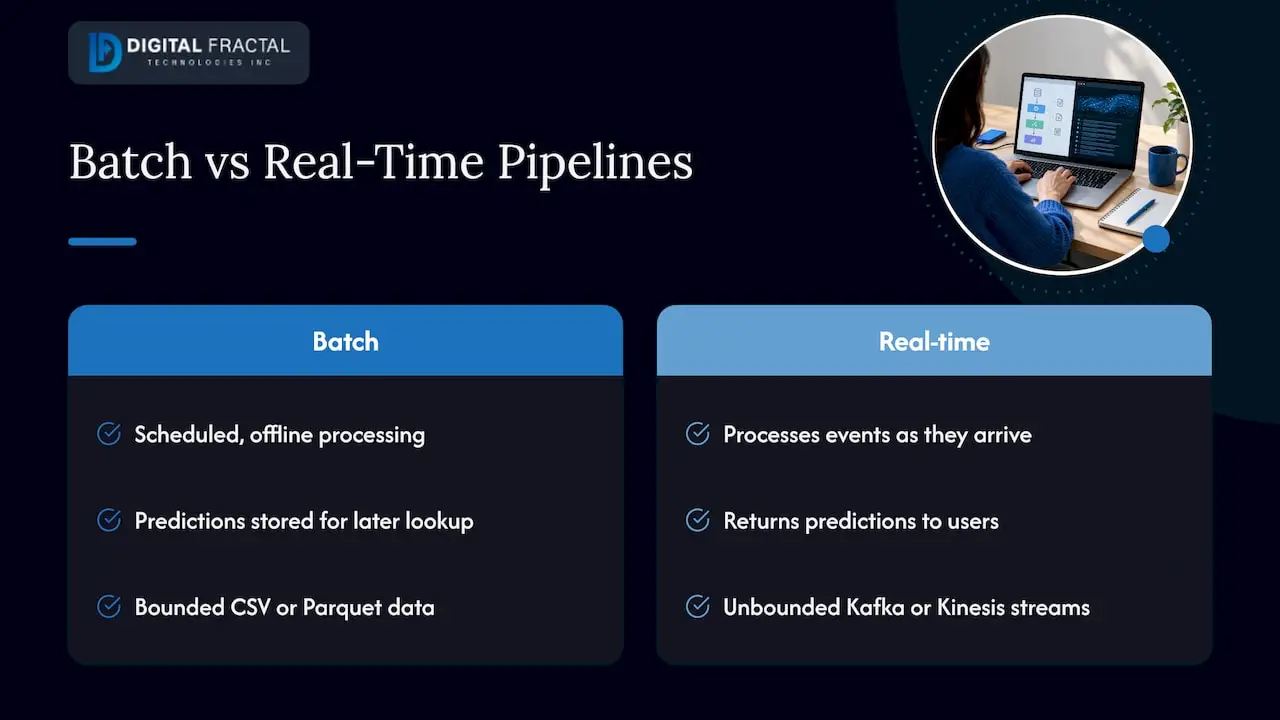
In a batch pipeline, data is collected over a period, stored, and processed offline on a schedule. Predictions are written to a database and looked up later. In a real-time pipeline, data is processed, fed into the model, and predictions are returned to users as events arrive, on infrastructure designed around streams rather than files.
The data itself behaves differently. Chip Huyen explains in that InfoQ article that batch data is bounded and usually sits in formats such as CSV or Parquet, while streaming data is unbounded and arrives through transports such as Kafka or Kinesis, so stream processing is never “finished”. That one fact explains most of the design differences: you cannot wait for all the data, so you compute over windows, keep state, and accept that late or out-of-order events happen.
A second distinction saves a lot of money. Nubank’s engineering team separates real-time inference, where a trained model synchronously returns a prediction on request, from real-time learning, where the model continually updates its parameters. They note the second is exciting but rare in practice. Nearly every business case you are likely to have, such as ETAs, anomaly alerts or pricing, needs the first. Training can stay on a schedule while inference runs live.
The four layers of the architecture
Different vendors draw the diagram differently, but the working parts are the same. Here is the version we use when scoping projects.
1. Event ingestion
Sensors, telematics, databases, app events and APIs all publish into an event transport. The streaming-first approach described by InfoQ uses Kafka, Kinesis or Pulsar for event transport. Your job at this layer is to agree on event schemas early. A GPS ping with a different timestamp format from one vendor’s devices will quietly corrupt every feature downstream.
2. Stream processing and feature computation
Raw events rarely go straight into a model. You compute features: the average speed over the last ten minutes, the number of failed scans at a dock door this hour, the count of card attempts in the last minute. Stream processors such as Flink or Samza do this in windows. Snowflake’s documentation, for example, describes stream feature views for continuous ingestion, with end-to-end feature freshness typically under 200 ms at the median for live clickstream and transaction signals. That is one vendor’s figure for its own product, so treat it as an order of magnitude, not a promise for your stack.
3. Feature storage and serving
A model usually needs more than the last few seconds. It also needs history: this driver’s average dwell time, this customer’s typical basket. Nubank describes a real-time pipeline that can combine the request payload, fresh streaming events and pre-generated historical features from a feature store. The offline store feeds training. The online store serves the same features in milliseconds. Snowflake’s documentation describes online serving as synchronizing the latest entity-keyed feature values so applications can fetch them in milliseconds instead of running a batch query.
4. Model serving and the feedback loop
The model sits behind an endpoint, or inside the stream job itself, and returns a score. After the fact, you capture what actually happened and compare it with what the model predicted. That feedback loop is what lets you detect drift and decide when to retrain. It is the layer most first projects skip, and the one that determines whether the system is still useful in month six.
Where real-time pipelines go wrong
Train-serve skew
The most common silent bug is applying different preprocessing in training than in production. Nubank defines this as train-serve skew and says the exact same preprocessing function must be applied in both the batch training pipeline and the real-time inference pipeline. The practical fix is one shared feature definition, written once and used in both paths, which is the main reason feature stores exist.
Stale or late data
A pipeline that is technically live but fed by a device that reports every five minutes is not real-time in any way the business can feel. Measure freshness at each hop, from event time to feature availability, not only at the model endpoint.
Overbuilding latency
The tighter the target, the more infrastructure you pay for. Real-time feature engineering also changes the cost profile: it scales with event throughput rather than with the data volume of a scheduled run. If the decision is made once an hour by a dispatcher, a pipeline that refreshes every minute is already faster than the human using it.
No monitoring
Models degrade as the world changes: new routes, new sensor firmware, a different customer mix. Watching inputs and outputs is not optional. We cover this in more depth in our guides to data drift detection and monitoring thresholds and to ML observability for production pipelines.
Serving patterns and realistic latency
How you serve the model decides what latency you can hit and what you pay. There are four common patterns.
| Pattern | How it works | Typical fit |
|---|---|---|
| Batch scoring | Scheduled job scores a table; results stored for lookup | Weekly demand forecasts, nightly risk lists |
| Precomputed online lookup | Predictions computed ahead and published to a key-value store | Low-latency reads where inputs are predictable |
| Online request/response | Model behind a REST or gRPC endpoint called per request | ETAs, scoring at checkout, in-app recommendations |
| Stream-embedded or edge | Model runs inside the stream job or on the device | Anomaly alerts, mobile and IoT where the network is unreliable |
On the first two rows, Databricks’ MLOps guide notes that batch or streaming inference suits higher-throughput, higher-latency cases, while low-latency predictions can be precomputed and published to an online key-value store. Precomputing is an underused trick: if the set of possible inputs is small, you get millisecond reads without a live model at all.
For a real production example of online serving, Shopify describes dedicated models loaded from a model registry, with core services and Flink streaming pipelines calling inference endpoints in real time and a feature store for low-latency feature access. An academic patterns paper describes a similar request path: client, API gateway, service mesh, then a model server, with autoscaling on concurrency and p95 latency. If your models sit behind many internal services, our note on ML API gateway design for microservices covers the routing and limits side.
Watch percentiles, not averages. A dispatcher does not experience the mean; they experience the slow one in twenty. Set service levels on p95 or p99 latency and alert on them.
Use cases that justify the effort
Real-time pipelines pay off where the value of a prediction decays quickly.
Logistics and routing. Alberta’s AI institute describes dynamic route optimization using live traffic, weather and road data, real-time disruption mitigation with anomaly detection, and demand-based routing, reporting service-level improvements of up to 65%. That is the use case behind most of the logistics inquiries we see: a live ETA, a re-sequenced delivery list, an alert when a shipment deviates from its pattern.
Industrial and field operations. In construction, oil and gas, and similar sites, connectivity is uneven. Sensors feed anomaly detection or predictive maintenance models, and scoring often has to happen near the machine. Our pieces on edge IoT analytics for real-time control and edge anomaly detection that flags locally before cloud review explain when to keep inference local.
Customer-facing apps. Fraud checks, personalization and instant feedback analysis all need an answer inside a user session. See real-time user feedback with AI for one example of that pattern.
Putting real-time inference inside a mobile app
Developers have two broad choices: call a server endpoint, or run the model on the device.
Server calls keep the model in one place, which simplifies updates, but they depend on the network. On-device inference works offline and removes the round trip. ONNX Runtime’s documentation says models must be converted to ONNX format (from PyTorch or TensorFlow), with bindings for Android, iOS and C#, and accelerators such as NNAPI on Android and CoreML on iOS. Google’s documentation describes the LiteRT CompiledModel API as a standard for on-device inference across Android, iOS, web, IoT and desktop, with GPU and NPU acceleration and asynchronous execution that can cut latency by up to 2x.
For connected devices that are sometimes offline, Microsoft documents a pattern where the model is stored in cloud storage, device metadata syncs even while offline, and a loader module caches the model locally and exposes a local web API. The same document points out that AI module images can be at least 1 GB, which matters on narrow-bandwidth links. Plan model size and update frequency like you plan app releases.
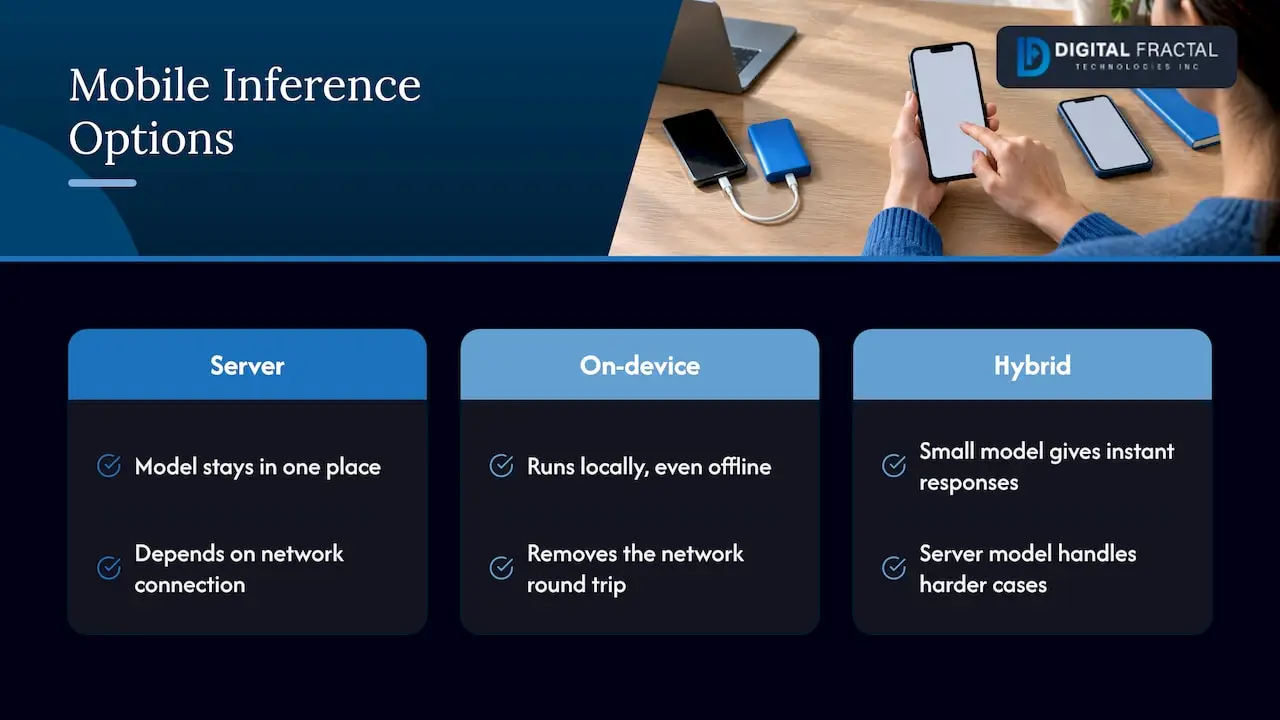
A hybrid is often the best design: a small on-device model for instant responses and a larger server model for harder cases. If you are building that into an app, we do the mobile and web application development and the model integration together, so the app, the API and the pipeline are designed as one system.
How to build one in a sensible order
- Write the decision down. Who or what acts on the prediction, how fast, and what a wrong or late answer costs. This sets the latency target.
- Check the data. Can you get the events, at the freshness you need, with consistent identifiers and timestamps? Our guide to enterprise data readiness lists what to assess.
- Start with batch features and real-time serving. Many teams get most of the value by serving a model live on features refreshed every few minutes. Move to per-event streaming features only where measurements show it matters.
- Define features once. One definition for training and serving, to avoid train-serve skew.
- Test end to end. Replay historical events through the whole pipeline and compare outputs with the offline run. See our end-to-end testing steps for ML pipelines.
- Instrument before launch. Track consumer lag, feature freshness, p95 and p99 latency, prediction distributions and, when ground truth arrives, accuracy.
- Plan retraining. A scheduled retrain with a clear promotion rule is enough for most teams.
- Control the bill. Autoscaling, right-sized instances and the choice between always-on and on-demand serving drive cost. Our cloud ML deployment cost-saving guide goes through the levers.
A useful habit: write a one-page latency budget. Split the target across ingestion, processing, feature lookup and inference, and give each hop a number. When the total slips, you know where to look.
Build, buy or bring in help
The components are mature and widely documented, so the hard part is rarely picking a tool. It is deciding which workflows deserve a live pipeline, fitting it to the systems you already run (dispatch software, telematics, ERP, mobile apps), and keeping it healthy after launch. Generic advice stops at the architecture diagram. A team that has to wire it into your actual workflows needs to know those workflows first.
That is why we start with the business process, not the tool. Our approach is tailored to your workflows, systems and goals rather than an off-the-shelf template, and we aim for tangible results within a 90-day timeline.
From pipeline idea to a scoped plan
Our AI Readiness Audit is a one-off engagement priced at $2,500 to $10,000. It is designed to identify where AI and automation can take repetitive work out of your operations, including in logistics and construction, so you know which use cases deserve a real-time pipeline before you spend on infrastructure. If you already know what you want built, our AI consulting and machine learning solutions cover discovery, implementation and build-out, and our workflow automation service connects predictions to the steps your team already follows. If you are in Canada, our AI consulting in Toronto and Vancouver pages describe how to reach us.
Our view
Most teams we talk to ask for “real time” when what they need is “fast enough for the person or system making the decision”. Those are different budgets.
We start from the workflow. Where does the prediction land, who acts on it, and what happens if it is two minutes late? Often the answer is a model served live on features refreshed every few minutes, with proper monitoring, instead of a full streaming build. When the answer is truly seconds, we design the streaming path with a single shared feature definition, tested end to end and instrumented from day one.
That is why we begin with an audit and tie every build to a 90-day outcome the business can measure. A pipeline is not the goal. A dispatcher who re-routes in time, or an app that responds instantly, is.
Souhail
FAQ
What is the difference between a data pipeline and a real-time ML pipeline?
A data pipeline moves and transforms data. A real-time ML pipeline does that on streaming data and also computes model features, serves a model with low latency, and captures outcomes for monitoring and retraining. The prediction step and its feedback loop are what make it an ML pipeline.
How fast is “real time” for machine learning?
It depends on the decision. Snowflake documents feature freshness typically under 200 ms at the median for its stream feature views, while many business uses are comfortable with seconds or minutes. Set the target from the decision, not from the technology.
Do I need online learning to have a real-time pipeline?
No. Real-time inference with a periodically retrained model is the common production pattern, and continuous parameter updates are rare. Scheduled retraining with monitoring covers most operational use cases.
Which tools do real-time ML pipelines use?
A typical stack uses an event transport such as Kafka, Kinesis or Pulsar, a stream processor such as Flink, an online and offline feature store, and a model server behind a REST or gRPC endpoint. The right mix depends on your cloud, your team and your latency target.
Can a small or mid-sized firm run one?
Yes, if the scope matches the decision. Start with one high-value workflow, such as ETA prediction or anomaly alerts, and grow from there. An audit first helps you choose that workflow with evidence.
Sources
- Streaming-First Infrastructure for Real-Time Machine Learning, InfoQ
- Real-time machine learning models in real life, Nubank Engineering
- Advanced feature engineering, Snowflake Documentation
- Unlocking Real-time Predictions with Shopify’s Machine Learning Platform
- Cloud-Native Patterns for Real-Time and Batch, IJIRCT
- The Big Book of MLOps, Databricks
- AI-Powered Route Optimization for Supply Chain Efficiency, Amii
- Deploy on mobile, ONNX Runtime
- On-device Inference with LiteRT, Google AI Edge
- Enable machine learning inference on an Azure IoT Edge device, Microsoft Learn